
Updated on 2026-03-04
views
5min read
Whether apps keep opening by themselves or you’re typing and random letters appear you never touched, it all points to iPhone ghost touch issues. Most of the time, the iPhone’s ghost touch issue appears because of a software glitch or misconfigured settings.
Whatever the cause, this guide will help you identify it and fix the issue right at home. In most cases, ghost touches arise from simple software faults that can be repaired easily using Passvers iOS System Recovery. And if there’s hardware damage, we’ll also help you pinpoint the root cause and understand the repair costs involved.
Possible Causes of iPhone Ghost Touch
Whatever the behavior is — the iPhone starts typing by itself and random letters appear that you didn’t press or apps launch without any touch, there are four main causes to blame. These issues are seen across iPhone models.
1. iOS Bugs
- One reason is that the update file itself becomes corrupted or incomplete.
- Or on older devices with aging batteries or heavy background load (many apps running), the new iOS build can create instability between the UI layer and the touch driver.
That’s when you see the screen typing random letters like “E” or WhatsApp opening on its own.
2. Faulty Screen Protector
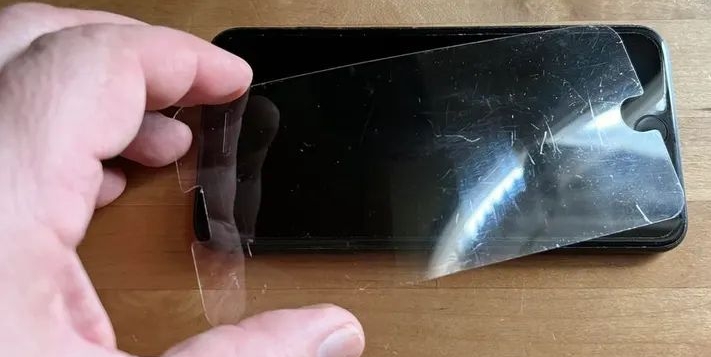
Using low-quality tempered glass creates uneven pressure points on the screen. When that happens, the iPhone’s sensors misread touch input. For instance, when you tap one corner of the keyboard, the iPhone triggers a different action entirely.
3. Improper Settings or Accessibility Options
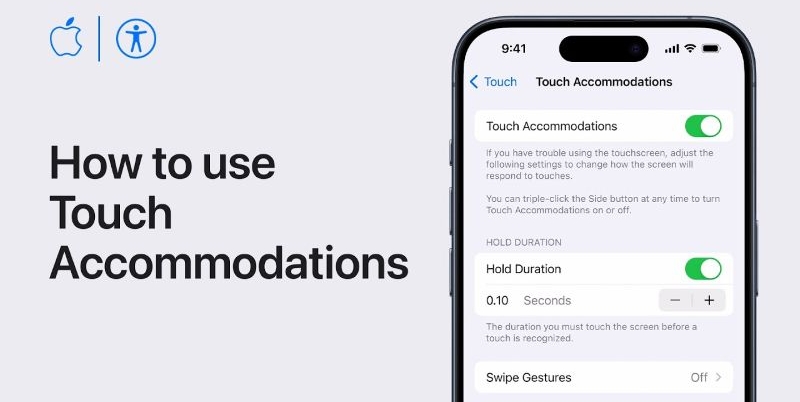
Accidental settings can also cause phantom touches, such as Touch Accommodations and 3D Touch/Haptic Touch Sensitivity. When these are misconfigured, ghost taps often appear in certain regions, like the edge of the keyboard or near the notification bar.
4. Broken Hardware
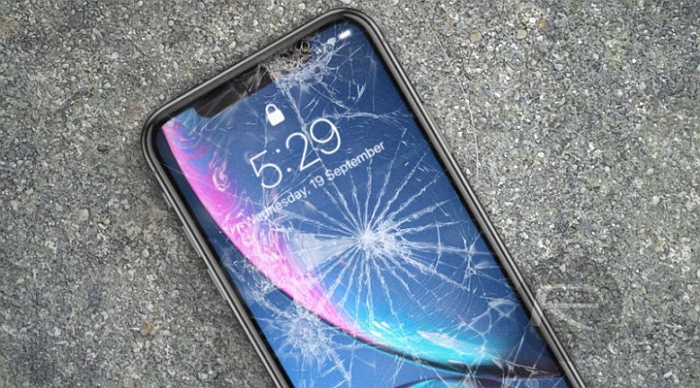
Ghost touches can also stem from damaged internal components — the digitizer grid, display connectors, or even the logic board. So, if the iPhone started showing the behavior after a drop or water exposure, broken hardware is your cue. Even third-party screen or battery replacements can create false input problems sometimes.
Can iPhone Ghost Touch Be Fixed?
Yes. The fix depends entirely on the cause.
- If it’s a configuration error or an iOS bug, software tools like Passvers iOS System Recovery can repair it in minutes.
- If it’s a physical damage, like a faulty screen protector, loose connector, or bad display, replacement or professional service is the only route.
We’ll now explore each scenario in detail and show how to stop your iPhone from tapping by itself for good.
Quick Solutions to iPhone Ghost Touch
Here are some quick solutions suggested by Redditors, which have helped fix iPhone ghost touch issues almost instantly. So, try them first.
Try This Reddit Trick First
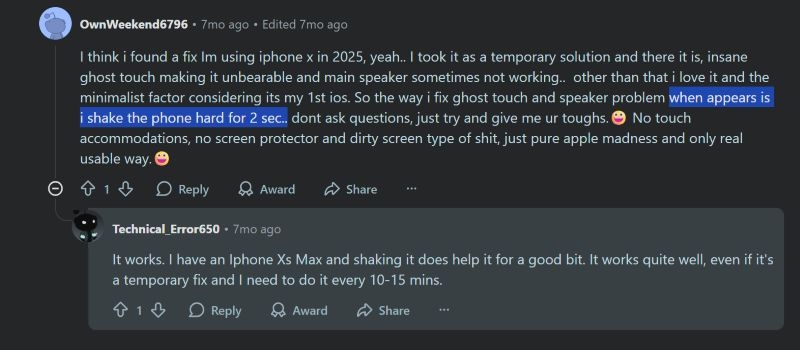
A Reddit thread with over 200 upvotes describes this simple trick that surprisingly works on many iPhone models, including iPhone X, XR, 11, 12, and even 13.
Moreover, users say it helps right after screen replacements too, whether they were Apple-certified or third-party repairs.
Gently Tap or Shake Your iPhone
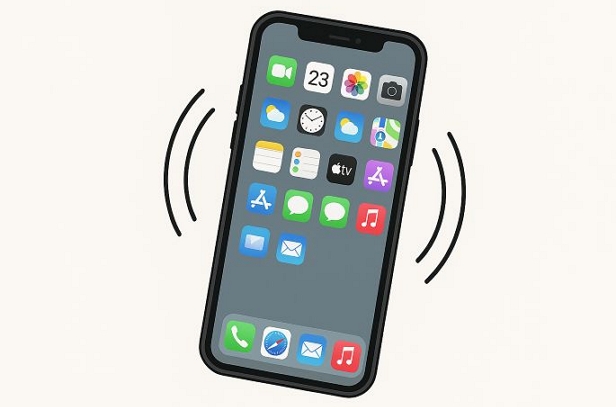
The idea here is to lightly tap or shake the device to stop the ghost touches.
Why this works is simple: sometimes loose internal contacts after a drop, repair, or heat expansion cause temporary miscommunication between the screen and the logic board. A quick tap or shake helps reconnect those contacts briefly.
To do it safely:
- Gently tap the upper half of the display once or twice.
- Or lightly shake the phone and observe if the ghost touches stop.
Note: This fix is only temporary. If a cable or display connector is slightly loose, tapping only resets the contact momentarily (e.g., 10-15 minutes). Heat or vibration can make it detach again later. So treat this as a quick test but not a permanent repair.
Start Basic Fixes
Now, we’ll start with the basic fixes — the simple steps that solve ghost touches for most users.
Fix 1. Remove Screen Protector
Yes, the random tap glitch often vanishes the moment you remove the screen protector.
Actually, the culprit is usually those generic Amazon or Temu protectors that cost barely ten dollars. They expand slightly with heat and press against the display glass, which can confuse the touch layer.
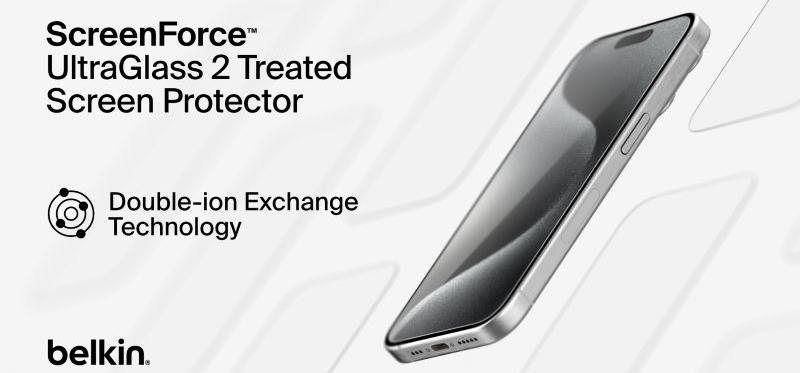
So, go with Belkin UltraGlass 2 (US$30-ish) or Spigen AlignMaster (also around US$30) instead. Both are known for precision and fit.
Fix 2. Keep Screen and Hands Clean
This one sounds trivial. However, lotion or sweat on your hands can trigger ghost touches. For instance, many people complain about the phantom taps after gym workouts or after eating oily food with your hands. Also, wipe the screen gently with a microfiber cloth.

Fix 3. Force Restart iPhone
If the ghost touches start suddenly, a simple restart often helps. On older iPhone that has been running too many apps, wrong data can get fed to the display driver. A force restart clears that memory and reloads the touch driver from scratch.
Here are the steps:
- iPhone 8 or later: Press Volume Up, followed by Volume Down. Then hold Side until the Apple logo appears.
- iPhone 7/7 Plus: Hold Side + Volume Down until restart.
- iPhone 6s or earlier: Hold Home + Top/Side until you see the logo.
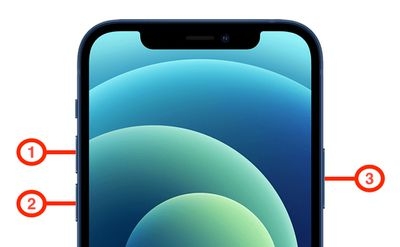
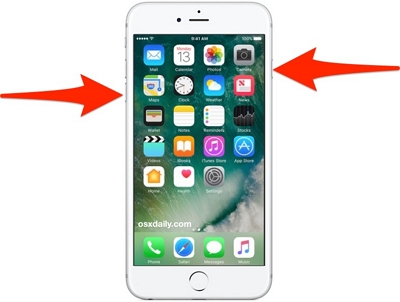
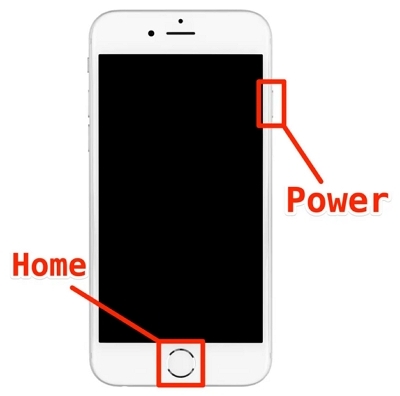
This method helps in most cases. Many users have reported that the ghost taps disappeared right after performing a reboot.
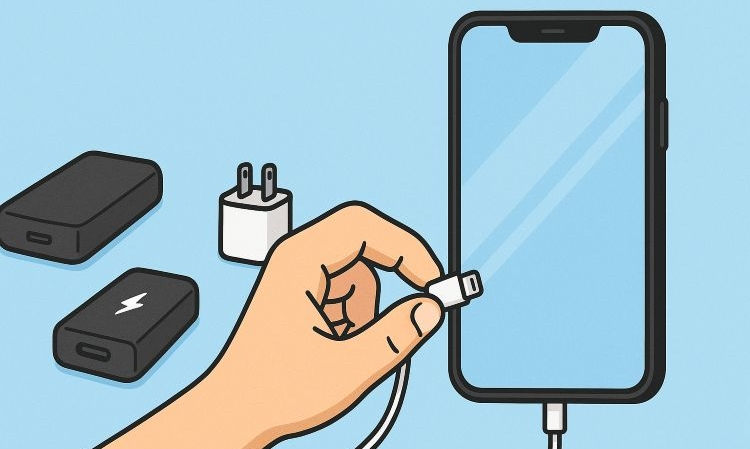
Fix 4. Disconnect Third-Party Accessories
External accessories can also cause ghost touches, for instance:
- Power banks
- Aftermarket wall chargers
- CarPlay adapters
- External gamepads or styluses
Simply unplug everything and test your iPhone. If the ghost touches stop, you’ve found the culprit. You can reconnect each accessory to see which triggers the issue. Then, replace that particular item.
How to Further Fix Ghost Touch on iPhone
This section will help you deal with ghost touch issues caused by deeper software faults and stop them from returning. It will also help you identify if the iPhone’s hardware is at fault and what the repair could cost.
Fix 1. Adjust Accessibility Options
Sometimes, random taps or self-tapping can be caused by built-in accessibility features themselves. Below are 2 settings you should check and ensure are not misconfigured.
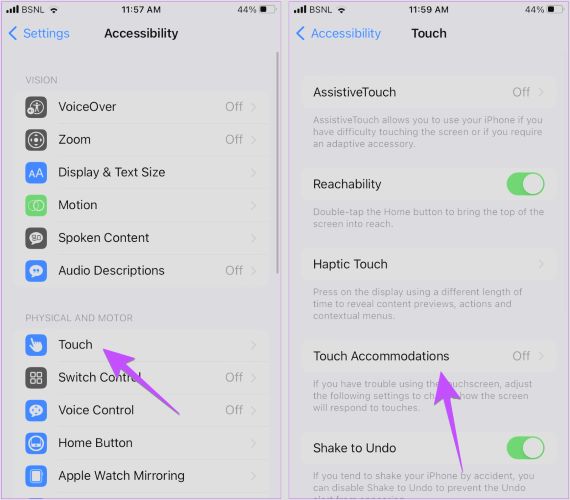
1. Touch Accommodations
This setting controls how long you must hold the iPhone before it responds. If configured incorrectly, it can misread light taps or double inputs.
Here’s how to turn it off:
- Open Settings.
- Move to Accessibility.
- Select Touch.
- Choose Touch Accommodations. Toggle it off and test typing or scrolling for 30 seconds.
2. 3D Touch/Haptic Touch Sensitivity
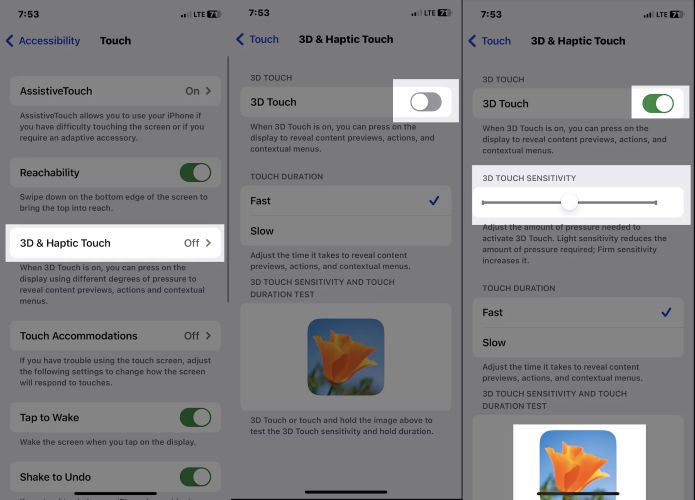
This setting defines how much pressure or how long a press triggers certain options. If the sensitivity is set to Light, the iPhone will register even the faintest touch as a deep press — opening apps or mistyping keys by itself.
To adjust it:
- Open Settings.
- Move to Accessibility.
- Select Touch.
- Open 3D & Haptic Touch (on newer models, this appears only as Haptic Touch).
- Adjust the Touch Duration slider toward Slow and test typing again.
Fix 2. Reset iPhone Settings
A full settings reset can clear the touch-response cache and remove any corrupted preferences that built up after an update. It resets accessibility toggles, display options, keyboard data, location preferences, and Wi-Fi passwords, so note them down beforehand.
However, it doesn’t delete your photos, apps, or any personal files.
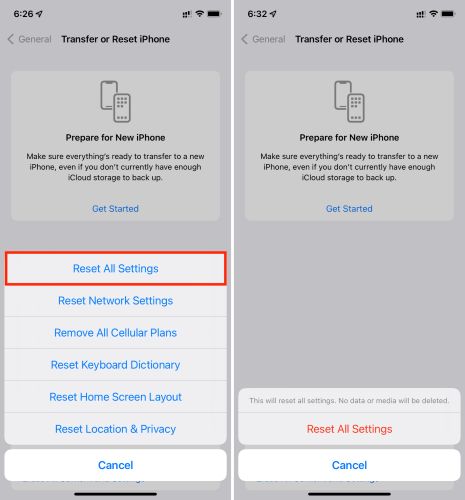
Here’s how to perform it:
- Open Settings.
- Move to General.
- Scroll to the bottom and select Transfer or Reset iPhone.
- Tap Reset.
- From the pop-up, select Reset All Settings.
- Input your passcode to confirm the reset.
The iPhone will restart normally with the ghost touch issue gone.
Fix 3. Repair iOS
You can repair the iOS software-level issues that interfere with display or touch response using Passvers iOS System Recovery. This tool has helped countless users fix ghost touch problems where apps open or type by themselves for days.
Passvers supports nearly all iPhone models, from iPhone 4s to iPhone 17, including devices running iOS 26. It also ensures complete data safety across most repair modes.
Passvers offers three modes: Free Quick Fix, Standard Mode, and Advanced Mode. Once you connect your iPhone, Passvers automatically detects the issue and guides you through choosing the right repair mode, letting you complete the entire process safely at home.
Key Features
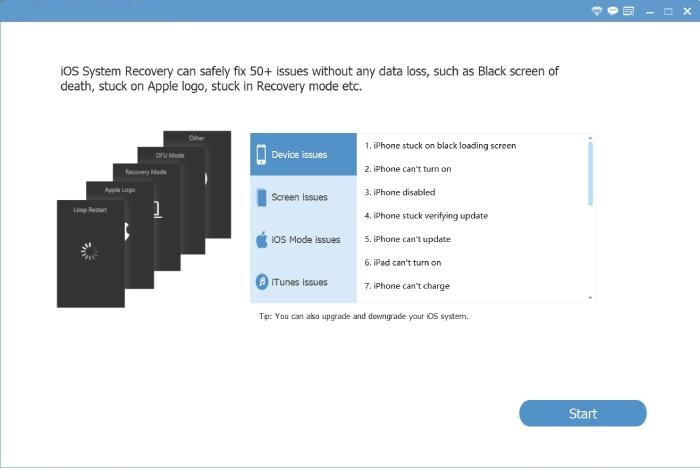
- Repair over 50+ iOS system issues, including ghost touch, freezing app, white screen of death, etc.
- Work on both Windows and Mac.
- Unlock disable or unavailable iPhone easily.
- Provide extra tools to help unjailbreak or downgrade iPhone safely.
Steps to Repair Ghost Touch Using Passvers iOS System Recovery
Step 1. Install and run Passvers iOS System Recovery on your computer. Then click Start to begin.
Step 2. Connect your iPhone to the computer using a cable.
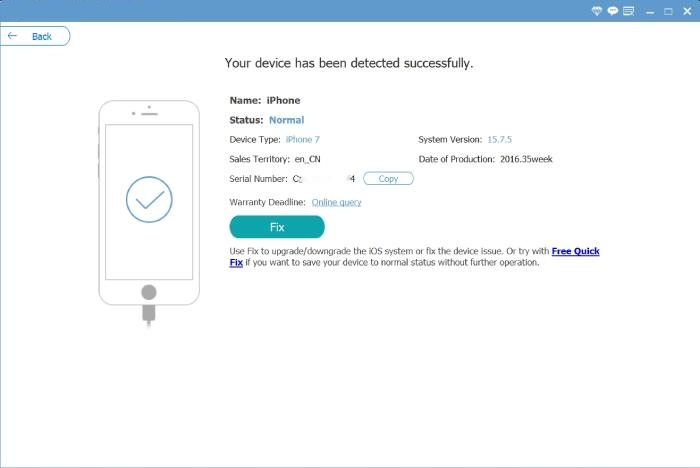
Step 3. Choose the blue Free Quick Fix link once your device details show up. Your iPhone will restart, and the ghost touch glitch will be gone without any data loss.
Step 4. If the issue remains:
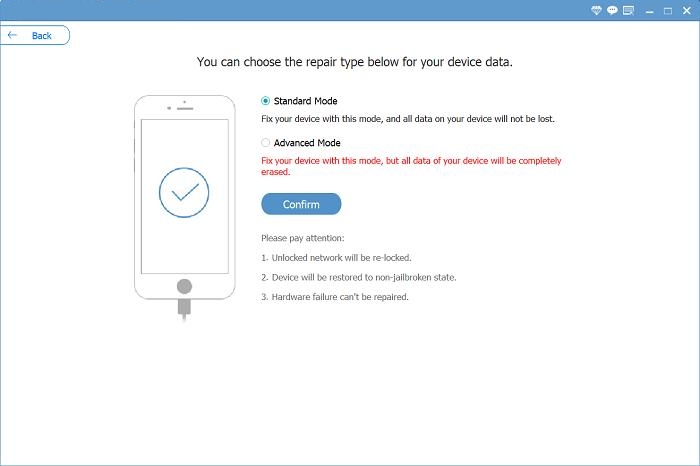
- Select Standard Mode (no data loss) to repair system-level faults or choose Advanced Mode. This method erases data, so back up your iPhone first.
- Then, follow the on-screen instructions.
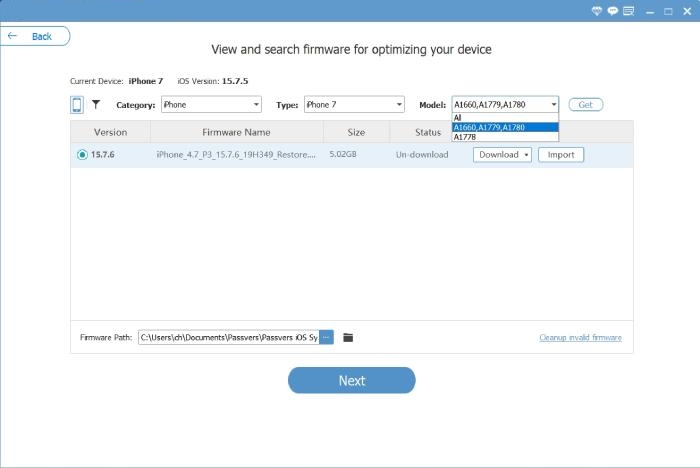
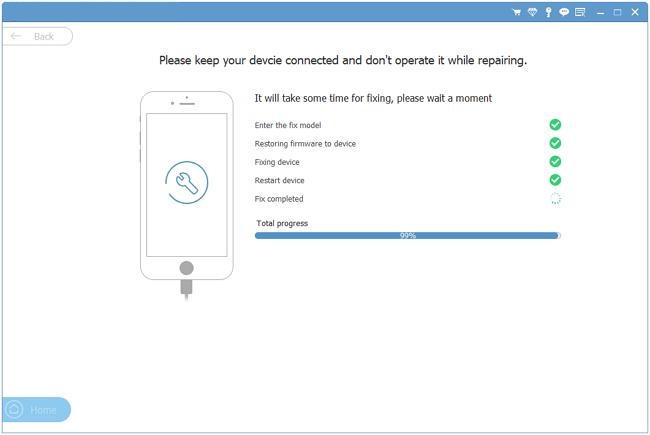
- Download the firmware package and wait for the repair to finish.
- Once your iPhone reboots, mistyped letters and self-opening app issues will stop entirely.
Fix 4. Update iOS
If ghost touches began right after an iOS update, the update itself was unstable. Wait for Apple’s next patch version. Those three-digit ones, like 18.1.1, 16.3.1, or 13.4.1, fix what earlier builds broke.
Here’s what to do:
- Go to Settings.
- Move to General.
- Tap Software Update.
- If a patch appears, choose Update Now.
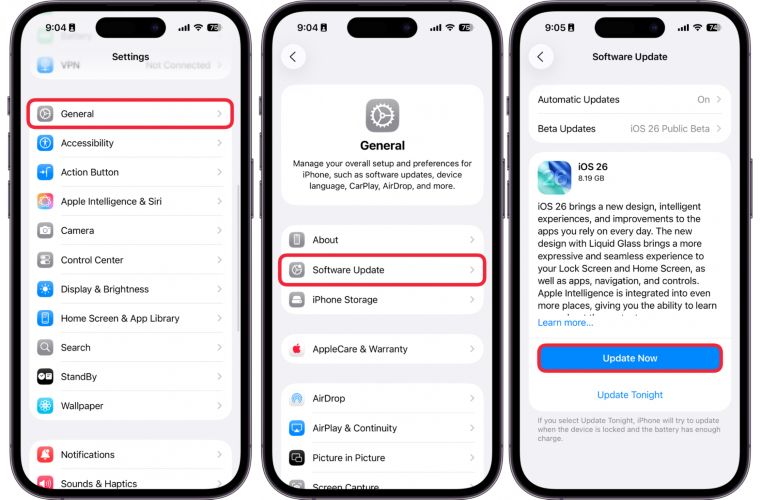
Note: If the issue returns after a few days or weeks, it points to a deeper firmware fault. In that case, repair the system using Passvers iOS System Recovery to permanently resolve the ghost touch issue.
Fix 5. Send iPhone for Repair
Ghost touches often appear when the screen digitizer has failed. Many users notice it right after updating iOS, which makes the timing seem odd, but it’s common.
Other times, it’s purely hardware problems: a drop, pressure damage, or a cheap screen replacement. Even a brief water dip, like two seconds in the bath, can trigger this fault.
In such cases, repair is strongly advised. Book a Genius Bar appointment or send your iPhone in for diagnostics.
Before repairing your iPhone, do the following:
- Back up all your data via iCloud or iTunes.
- Record a short video of the ghost touches, which helps technicians identify the issue quickly.
- Remove the screen protector or case before handing it in.
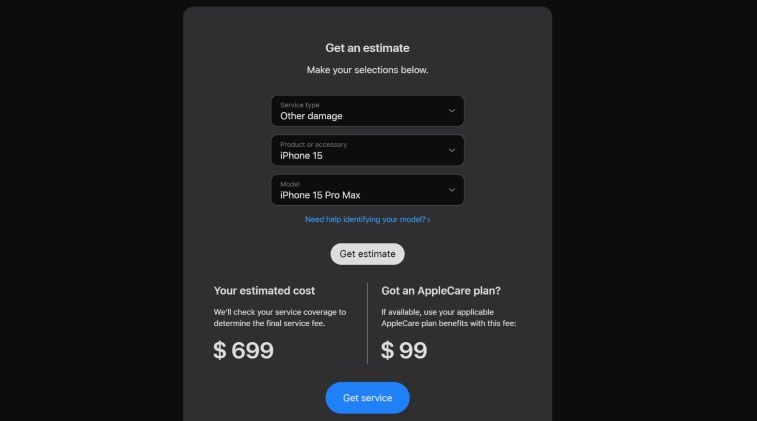
What Is the iPhone Ghost Touch Repair Cost?
Here’s a quick overview for the U.S.:
| Model Category | With AppleCare+ (Accidental Damage) | Without AppleCare+ (Out of Warranty) |
|---|---|---|
| Recent Face ID Models (iPhone 14/15/16/17) | US$29 for screen or back glass US$99 for other damages |
Around US$379 for screen replacement Up to US$699 for other hardware issues |
| Mid-Age Models (iPhone 11/12/13) | US$29–US$99 service fee | About $329 for screen replacement Up to $549 for board or digitizer repairs |
| Replace or swap third-party screens/battery with original | — | Depend on technician and parts used US$185+ for screen and battery swap (comparable to trade-in value) |
To get an exact quote: simply visit Apple’s Repair and Service page. Select your iPhone model and issue type—screen or other damage. It will give you an estimated repair price for your region.
Summary
So, that’s how you fix the ghost touch issue on an iPhone. It’s rarely as serious as it looks. Yes, in a few cases, it can be a problem with the digitizer grid or touch controller and going for a repair is the solution.
When software glitches return again and again, it’s better to use Passvers iOS System Recovery. It repairs touch response back to factory precision, so the ghost touches never return. Plus, it’s easy to use and saves you the trouble of repeated resets or expensive repairs.