
Updated on 2026-03-03
views
5min read
Unlocking your iPhone from a carrier can feel confusing, especially if it’s your first time going through the process. Whether you’ve already paid off your device or simply want to use a local SIM card, carrier unlocking lets you switch to any compatible network with ease.
A common question many users ask is: How long does it take to carrier unlock an iPhone? The answer isn’t one-size-fits-all—it depends on factors like your carrier’s policies, payment status, and the method you choose to request the unlock. In this guide, we’ll walk you through everything you need to know about iPhone carrier unlocking.
Part 1: How to Check If Your iPhone Is Unlocked
Are you curious if your iPhone is unlocked from its carrier? Here are three reliable methods to check if your iPhone is unlocked:
Method 1. Check iPhone Unlock Status Through Settings
This is the simplest approach if your iPhone is running a recent iOS version.
Step 1: Go to Settings → General → About.
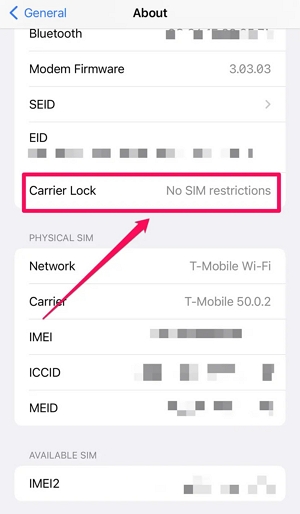
Step 2: Scroll down to find “Carrier Lock” or “Network Provider Lock.”
- If it says “No SIM restrictions,” your iPhone is unlocked.
- If it shows a carrier name or “SIM locked,” the device is still locked.
Method 2. Check If iPhone Is Carrier Unlocked Using Another SIM Card
This method tests whether your phone accepts SIM cards from other carriers.
Step 1: Power off your iPhone and remove the existing SIM card.
Step 2: Insert a SIM card from a different carrier (make sure it’s active).
Step 3: Restart your iPhone and try making a call, sending a text, or using mobile data.
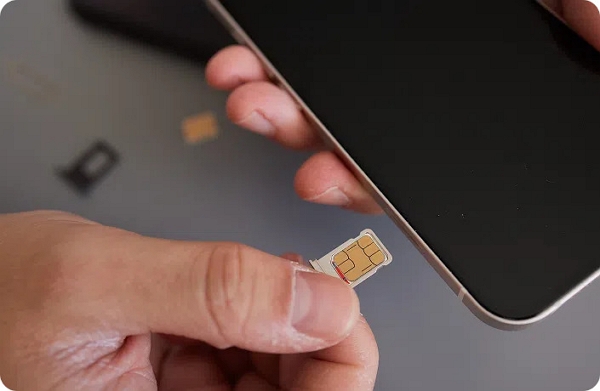
- If everything works, your iPhone is unlocked.
- If you see “SIM not supported” or “network not supported,” the iPhone is still locked.
Method 3. Check iPhone Carrier Lock Status with Online IMEI Tools
Your iPhone’s IMEI can also confirm whether it’s locked or unlocked.
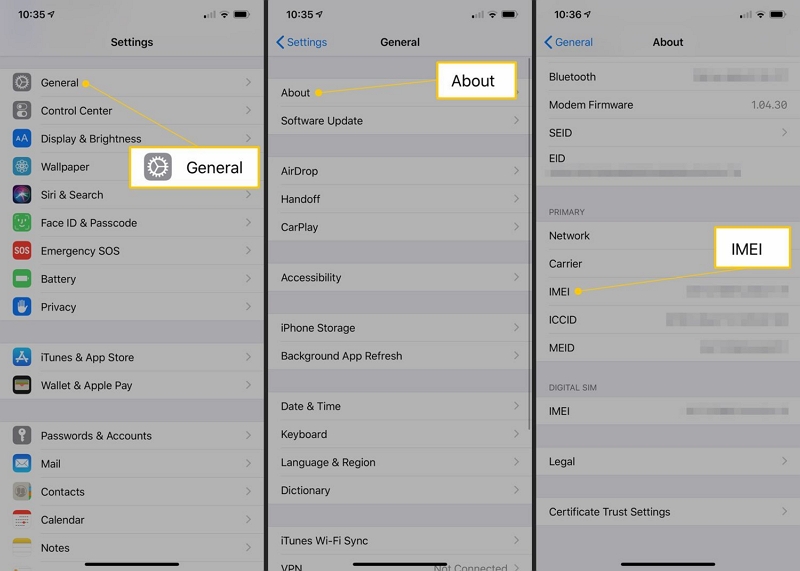
Step 1: Go to Settings → General → About and find the IMEI. Alternatively, dial *#06# to display it.
Step 2: Visit a trusted online IMEI checker or SIM-lock status service.
Step 3: Enter the IMEI, and the tool will reveal if your iPhone is unlocked.
Part 2: How Long Does It Take to Carrier Unlock an iPhone? (Main Answer)
So, how long does it take to carrier unlock an iPhone? The timeline isn’t the same for everyone—it depends on your carrier’s policies and your account status.
Typical timeframe: Most iPhones are unlocked within a few hours to 7 days once the request is approved.
Faster unlocks: Some carriers process the request instantly if your device is fully paid off and your account is in good standing.
Longer cases: In rare situations, it may take up to 2 weeks, especially if there are delays with account verification, outstanding balances, or technical checks.
In short, if everything is in order, you can usually expect your iPhone to be unlocked in less than a week.
Part 3: Factors That Decide Unlocking Time
Unlocking an iPhone doesn’t always happen instantly. Several factors determine how long it takes to carrier unlock an iPhone. The most important ones are:
Carrier policies
Each carrier has its own rules. For example:
- Verizon locks devices for 60 days after activation, then removes the lock automatically.
- T-Mobile can approve and complete an unlock in up to 2 business days once eligibility is confirmed.
Payment or contract status
If your iPhone is financed, leased, or under contract, it usually must be fully paid off before being unlocked. Carriers verify this, and any unpaid balance can delay or block the request.
iPhone model & iOS version
Some newer iPhone models or specific iOS versions may require extra steps. Even after the carrier approves the unlock, you might need to restore or update your iPhone to activate it.
Account issues (unpaid bills or blacklist)
Your account must be in good standing. Outstanding bills, overdue fees, or if the iPhone is reported as lost, stolen, or blacklisted, the carrier will either reject or postpone the unlock.
Part 4: Typical Carrier Unlock Timeframes
When asking “how long does it take to carrier unlock an iPhone”, here are the most common timelines you may encounter:
| Timeframe | What It Means |
|---|---|
| Same-day or instant unlocks | If your iPhone is fully paid off and all requirements are met, some carriers with automated systems can unlock it instantly or within a few hours. |
| 24–72 hours (most common) | The typical timeframe for most carriers. Once your unlock request is approved, the process is usually completed in 1–3 business days. |
| Up to 7 business days | Minor issues—such as missing documents, buying from a third party, or seasonal backlogs—may extend the unlock process up to a week. |
| 1–2 weeks or more (international/complex cases) | If the iPhone is locked to an international carrier, involves legal checks, or requires Apple’s direct assistance, it can take 1–2 weeks or longer. |
Part 5: Step-by-Step Guide to Carrier Unlocking an iPhone
Unlocking your iPhone from AT&T lets you use it with different carriers both in the U.S. and internationally. Here’s the step-by-step guide:
Request an Unlock from AT&T
Step 1: Make sure your device meets AT&T’s unlock criteria (an active AT&T account in good standing, device fully paid off, and other eligibility requirements).
Step 2: Visit the AT&T Device Unlock Portal and fill in the online form with your iPhone’s IMEI number.
Step 3: AT&T will review your request and send the result to you by email.
How Apple updates the unlock status
After AT&T grants the unlock approval –
Step 4: Apple remotely refreshes the device’s unlock status, usually within 24 to 72 hours.
Step 5: To validate the unlock, navigate to Settings > General > About. Under “Carrier Lock”, it must indicate "No SIM restrictions."
Final steps: inserting a new SIM
Once the unlock is verified –
Step 6: Power off your iPhone and remove the AT&T SIM card using a SIM ejector tool.
Step 7: Insert the new SIM card from your preferred carrier.
Step 8: Turn on your iPhone. It should automatically recognize the new carrier and activate the service. Follow any on-screen prompts to complete setup.
FAQs
Q: How can I speed up the iPhone carrier unlocking process?
To accelerate the iPhone carrier unlock process, make sure your device is completely paid off, has no unpaid bills, check if it is not blacklisted, and contact your carrier’s customer support to verify eligibility and expedite the unlock procedure.
Q: Does unlocking an iPhone void the warranty?
No, using official carrier methods approved by Apple to unlock your iPhone does not invalidate its warranty. Your device is still completely protected under Apple’s standard warranty conditions.
Q: Is carrier unlocking the same as jailbreaking?
No, unlocking a carrier and jailbreaking are different processes. Carrier unlocking enables your iPhone to operate with different providers by eliminating network limitations. In contrast, jailbreaking alters the iOS system itself, providing access to applications and features prohibited by Apple—and it may void your warranty.
Conclusion
The time it takes to carrier unlock an iPhone varies—ranging from a few hours to a couple of weeks—depending on your carrier’s policies, device status, and account conditions. While the official carrier method works, it can sometimes be slow or complicated.