
Updated on 2026-03-01
views
5min read
If you see the message “SIM Locked” on your iPhone, it means the device only works with the carrier you bought it from. Carriers usually add this lock to keep you on their network until your contract ends. While not always a problem, it can be frustrating if you want to switch providers or use a cheaper local SIM while traveling.
In this guide, we’ll explain exactly what SIM locked means on iPhone and show you the best ways to unlock it.
Part 1: What Does SIM Locked Mean?
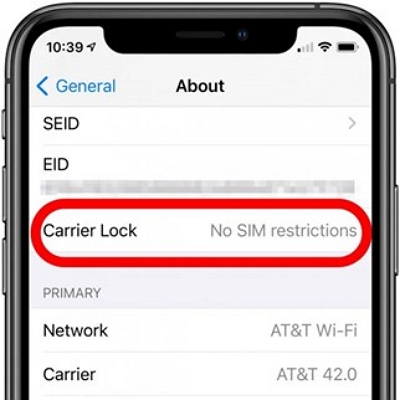
A SIM-locked iPhone is restricted to one carrier. This means you cannot use SIM cards from other providers for calls, texts, or mobile data. If your settings show “No SIM Restrictions” under Carrier Lock, it means your iPhone is fully unlocked and can work with any compatible SIM card worldwide.
SIM Lock vs. Carrier Lock vs. Network Lock vs. Region Lock
Many people use these terms interchangeably, but they are not the same.
| Lock Type | Definition | Scope | Common Use Case | Unlocking Method |
|---|---|---|---|---|
| SIM Lock | Restricts a phone to accept only one SIM card. | Individual SIM | Prevents use of a SIM in another phone. | Needs PIN/PUK reset with carrier help. |
| Carrier Lock | Ties a phone to one carrier’s network. | Specific carrier | Carrier-subsidized iPhones sold on contract. | Request unlock from the carrier. |
| Network Lock | Restricts use to one mobile network. | Specific network | Seen in CDMA networks. | Unlock code or third-party services. |
| Region Lock | Limits phone use to a geographic region. | Region-based | Common in gaming devices and some phones. | Firmware update or manufacturer support. |
Part 2: Why Are Phones SIM Locked?
Carriers and manufacturers often SIM lock phones to protect their business model and manage device usage. Here are the main reasons and what they mean for you:
Subsidized Devices and Contracts
Phones sold at a discount or with monthly payment plans are usually locked. This ensures you finish the contract before switching carriers.
Preventing Early Termination and Resale
SIM locks stop people from buying cheap contract phones and immediately reselling them for profit. For users, this means you can’t freely move your phone to another network until it’s unlocked.
Network Compatibility Assurance
Some carriers lock devices so they only run on their specific network technologies. This helps guarantee stable calls and data speeds but limits your freedom to change carriers.
Regional Locking to Control Market Distribution
Certain brands, like Samsung, also use region locks to control distribution and pricing. If you travel or buy a phone abroad, you may find it won’t work with a SIM from another region until unlocked.
Part 3: How to Check if Your Phone is SIM Locked
Before switching carriers or traveling abroad, it’s important to check whether your iPhone is locked. Here’s how:
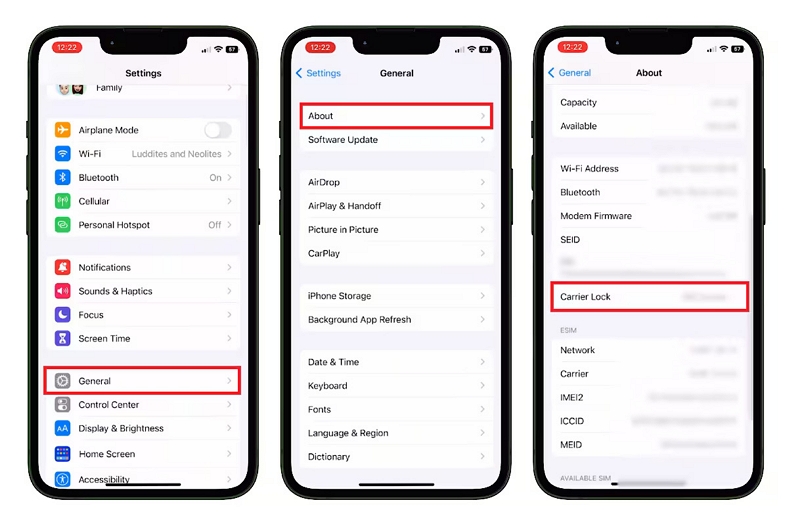
Step 1. Open the Settings app.
Step 2. Tap General > About.
Step 3. Scroll down to Carrier Lock.
- If it says “No SIM restrictions”, your iPhone is unlocked.
- If it shows a carrier name or “SIM locked”, your phone can only be used with that carrier.
If your iPhone is locked, you’ll need to request an unlock from your carrier before using another SIM card.
Part 4. Pros and Cons of SIM-Locked iPhones
4 Advantages of SIM-Locked iPhones
- Cheaper upfront cost – Phones are often sold at a discount when tied to a carrier.
- Exclusive features – Some carriers add special services or network optimizations.
- Installment payments – Easier financing options make devices more affordable.
- Simplified support – Easier warranty and customer service.
5 Drawbacks of SIM-Locked iPhones
- Carrier restriction – You can’t freely switch to another provider until it’s unlocked.
- Unlocking may cost extra – Some carriers charge fees or require conditions to be met.
- Slower software updates – Updates are tested and approved by the carrier first.
- Pre-installed apps (bloatware) – Extra apps from the carrier may take up space.
- Lower resale value – Locked phones are less attractive to second-hand buyers.
Part 5: Main Solutions to Unlock a SIM-Locked Phone
If your iPhone or Android shows the message “SIM Not Supported”, it usually means the device is locked to one carrier. There are two primary ways to remove this restriction:
Option 1: Contact Your Carrier (Official Method)
The safest and most reliable method is to request an unlock directly from your carrier. This is permanent, legal, and won’t void your warranty.
Steps to unlock through a carrier:
Step 1: Check your eligibility (the phone should be fully paid off, not reported lost or stolen, and associated with an active account).
Step 2: Contact your carrier’s customer support and submit an unlock request.
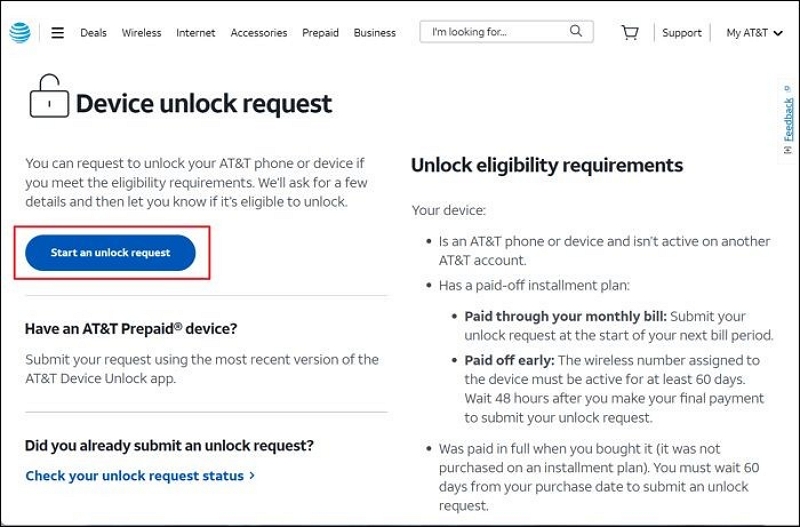
Step 3: Wait for confirmation (usually 24–72 hours, though some carriers take up to 7 days).
Step 4: Insert a new SIM card to verify the unlock.
Pros: 100% safe, permanent, keeps warranty valid.
Cons: Might take several days, and approval depends on carrier policies.
Option 2: Use Passixer (Third-Party Solution)
If your request is denied or you need a faster solution, you can use Passixer. This tool is designed for iPhones and can bypass SIM lock in situations where carriers refuse to help.
When to use this method:
- You bought a second-hand iPhone and the carrier refuses to unlock it.
- You need urgent use of a different SIM card while traveling abroad.
Pros: Quick results, no need to wait for carrier approval.
Cons: Requires jailbreak and turning off Find My iPhone. May not work on blacklisted/financed devices.
In Summary:
- Best choice: Unlock via your carrier if possible (safe, permanent, no jailbreak).
- Alternative: Use Passixer when official carrier unlock isn’t available.
While the two methods above are the most common, unlocking policies and tools can vary depending on your country, carrier, or phone brand. In the next section, we’ll expand on additional methods and important considerations so you can find the best approach for your situation.
Part 6: Extended Unlocking Methods for SIM-Locked Phones
If carrier requests and Passixer are not enough, here are other scenarios and solutions you should know:
Method 1. Carrier Unlocking (Official & Safe)
| Carrier | Unlock Conditions | Processing Time | How to Unlock |
|---|---|---|---|
| AT&T (US) | Device fully paid, not reported stolen, active account | 1–3 business days | Submit request via AT&T Device Unlock Portal |
| T-Mobile (US) | Active for at least 40 days, not reported lost or stolen | Instant (via app) | Use the T-Mobile app or contact support |
| Verizon (US) | Postpaid devices unlock automatically | 60 days after activation | No request needed, unlocks automatically |
| O2 (UK) | Contract completed or device paid off | 3–5 business days | Submit request via O2 website |
| EE (UK) | Device fully paid, no outstanding balance | Up to 10 business days | Apply through EE customer support |
| Vodafone (UK) | Must be on Vodafone network for at least 30 days | 1–7 business days | Request via Vodafone online form |
| Three (UK) | Devices sold after Jan 2020 are unlocked by default | N/A | Older devices can be unlocked via Three’s website |
Carrier unlocks are always free of charge if you meet the requirements. Processing times vary from instant (T-Mobile, Verizon) to up to 10 days (EE).
Method 2. Brand Unlocking (Apple Store Assistance)
- iPhone: Carrier unlock is usually tied to Apple’s server. Once approved, your iPhone will be permanently unlocked after inserting a new SIM card and connecting to Wi-Fi/iTunes.
- Samsung & Other Android Brands: Often use a numeric unlock code provided by the carrier. You insert another SIM card, enter the code, and the phone becomes usable on other networks.
- Chinese & Regional Brands: Some smaller brands may only support unlocking through official service centers.
Method 3. IMEI Unlock Services (Paid Options)
Online IMEI unlock services promise to permanently unlock your phone using its IMEI number.
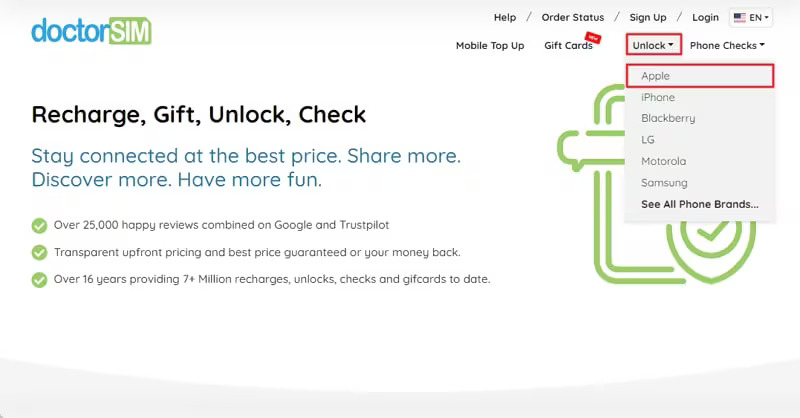
Step 1: Visit the doctorSIM unlocking webpage. Dial *#06# on your device to retrieve the 15-digit IMEI number and enter it on the site.
Step 2: Select the brand, model of your device, and the carrier to which it is locked. Complete your purchase with safe payment options.
Step 3: Once the processing is complete, an email will be sent to you containing the unlock code and specific instructions.
Step 4: Adhere to the given guidelines to access your device.
Pros: Works remotely, no need for carrier approval.
Cons: Many scam websites exist; results are not guaranteed. Always research before using.
Method 4. Legal and Practical Considerations
- Fake IMEI sites can steal your money.
- Unofficial unlocks may void warranty.
- Always double-check before paying.
With these options, you now have a complete picture: start with the official carrier request, consider brand-specific instructions, and only use third-party IMEI services if absolutely necessary. This ensures you unlock your iPhone safely and legally while minimizing risks.
Part 7: FAQs
Q. Does unlocking delete my data?
No. Unlocking a SIM-locked iPhone only removes carrier restrictions; your photos, apps, and files remain intact.
Data loss only happens if you perform a factory reset during the process. Always back up your device via iCloud or iTunes before attempting unlock-related operations. For additional safety, you can use Datile iOS Recovery to create a full backup and restore any accidentally lost files.
Q. Is SIM unlocking legal?
Yes, in most regions it is legal. For example, in the United States, the Unlocking Consumer Choice and Wireless Competition Act (2014) allows consumers to unlock phones.
Exceptions: Some countries (e.g., Canada, Chile, China, Israel, Singapore) prohibit SIM locking, so all phones are sold unlocked by default. Always check your local regulations to avoid violating carrier terms.
Q. SIM locked vs no SIM — what’s the difference?
- SIM Locked: Phone only works with one carrier’s SIM (e.g., bought on contract). Needs to be unlocked to switch providers.
- No SIM Restrictions: Phone is unlocked and can work with any compatible SIM worldwide.
Q. Will unlocking affect my warranty or AppleCare?
Generally, official unlocking methods (through carriers or Apple) will not void your warranty. However, using third-party tools or unauthorized services may risk warranty coverage.
Q. Can I unlock an eSIM iPhone?
Yes. If your iPhone uses eSIM, the unlocking process is the same as for a physical SIM. Once unlocked, you can add multiple eSIM profiles from different carriers.
Q. How long does unlocking usually take?
- Carrier unlocks: anywhere from a few minutes to 10 business days, depending on your provider.
- Third-party tools: instant (but may involve risks).
- Apple support unlock: typically 24–72 hours if you meet all requirements.
Q. Will my unlocked iPhone work abroad?
Yes. An unlocked iPhone allows you to insert a local SIM card when traveling, helping you avoid expensive roaming fees. Just ensure your iPhone model supports the frequency bands of the local network.
Conclusion:
Mastering how SIM locks work ensures you can switch carriers freely, cut roaming costs when traveling, and enjoy the full flexibility of your iPhone. Whether you choose an official carrier unlock or a third-party tool, the key is to pick a safe and reliable method.