
Updated on 2026-02-17
views
5min read
A deleted photo on iPhone normally sits in the Recently Deleted folder for up to 30 days. However, if it is gone from there because you emptied the folder or 30 days were passed, then the photo is treated as “permanently” deleted. You can’t find it anywhere on your iPhone.
At that time, you can retrieve the deleted photos easily with its backup. What if you haven’t backed up the lost images before? Can you restore the permanently deleted iPhone photos without backup? Let’s break down the answer now.
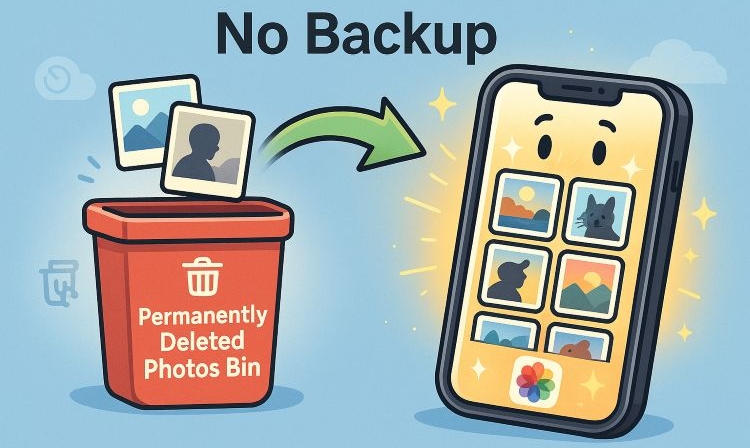
Is It Possible to Recover Permanently Deleted Photos from iPhone Without Backup
Yes. Permanently deleted iPhone photos are not instantly gone even when you don’t have a backup. They are hidden from view but still present on the device for some time. Before talking about the possibility of recovering permanently deleted iPhone photos without backup, let’s first understand where these photos go.
Where Do Permanently Deleted Photos Go on iPhone?
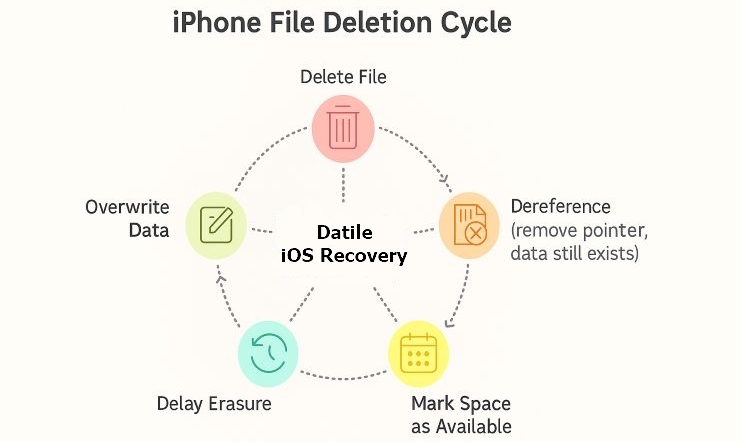
When you tap the “Delete” button, the photos will first move to the Recently Deleted folder. After 30 days, they disappear from there too.
However, even then, the photos don’t vanish completely. Instead, they sit on your iPhone storage as dereferenced files that are invisible to you, but very much there. Along with the image, the metadata such as file name, date and other details is also kept in the background.
iOS simply marks the storage space as “unallocated”, meaning new files are allowed to take that slot. However, until that overwrite happens, the photo still exists on the iPhone.
Possibility
The chances of recovery depend mainly on one factor: whether the deleted space has been overwritten. If it hasn't, the possibility of bringing photos back remains high.
Note: You should minimize the usage of the iPhone. This allows you to avoid overwriting the iPhone’s storage and maximize the chances of recovering the photos that could still be present.
How to Recover Permanently Deleted Photos from iPhone Without Backup
Now that you know recovering the permanently deleted photos is possible without having a backup, here are the ways you can actually make it happen. Although each method works in a different situation, it is reliable to bring your photos back.
Way 1. Check Shared Photos and Save Target Ones
Sometimes, recovery doesn’t need any external help. If you’ve shared the photos with friends or family, chances are a copy still exists on their side. All it takes is asking them with a quick message or call and you will get the images back in seconds. Also, most sharing platforms keep a copy of shared content, so your missing photo could be hiding in plain sight.
Where You Should Check
Think of your familiar platforms:
- WhatsApp – Open the chat, tap on Media, Links, and Docs to filter only images. Don’t forget about WhatsApp backups too, as they often store older media.
- Message – Scroll through iMessages conversations or search the thread. Photos exchanged there usually stay stored for long.
- Instagram – Check DMs, story shares, or even old posts. Hidden galleries on apps like this sometimes hold what you’ve forgotten.
- Snapchat – Saved chats or Memories could still carry the photo.
- Email – Photos often travel as attachments, so your inbox may be an unexpected vault.
- Shared Albums or Cloud Links – A quick scan here will surprise you with copies you didn’t realize were stored.
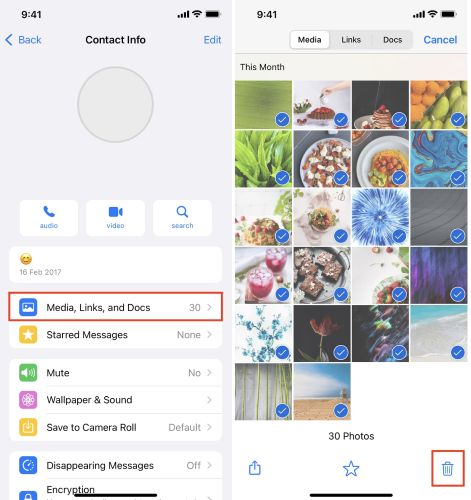




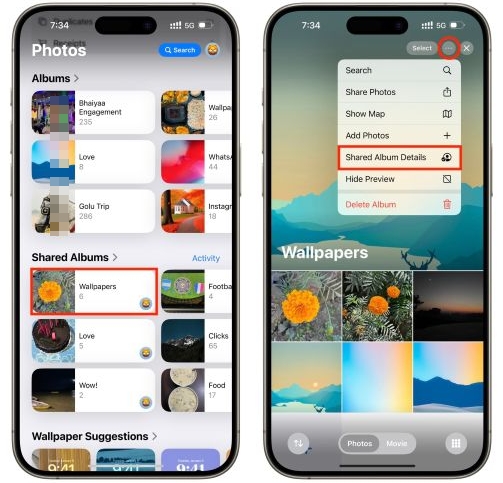
This method doesn’t demand tech skills or recovery software. Just retrace the channels where you normally share and store pictures. A couple of minutes of checking could bring the photos back.
Way 2. Retrieve Photos Using Professional Data Recovery Tool
As already explained, those photos could still be present on your iPhone. A professional data recovery tool like Datile iOS Recovery scans deeply into your iPhone storage and makes it possible to bring back permanently deleted photos with ease. Datile can find and show you every piece of data stored on the device, whether deleted, invisible or still present and lets you choose the wanted photos to restore.
Datile is shown to handle large volumes of recoverable photos. For many users, it has successfully recovered up to 1000 deleted photos in the same original quality and full metadata. Additionally, it works with the latest iPhones (up to iPhone 17) and the newest iOS versions. Plus, you can install it on both Windows and Mac. The interface is also clean and very simple to use.
Key Highlights
- Support more than 36 file types: photos, videos, contacts, messages, call logs, notes and app data.
- Recover the photos even from iPhone damaged due to water, drops and system corruption.
- Preview the photos found on the iOS storage before recovery.
- It can scan iTunes and iCloud backups and allows you to selectively restore the photos instead of restoring the iPhone completely.
How to Recover Deleted Photos with Datile
Step 1. Install and Connect
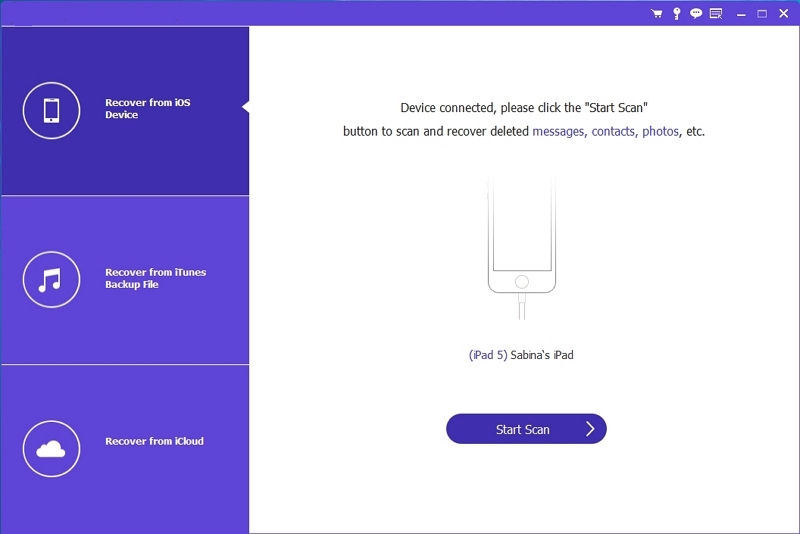
Download Datile on your computer (Mac or Windows) and connect your iPhone. Then, select Recover from iOS Device.
Step 2. Run a Scan
Datile quickly combs through your iPhone’s storage and finds both visible and hidden photos sitting on the storage sectors.
Step 3. Preview Results
Tick Camera Roll and Photo Library categories on the left pane. You can choose to filter results to show only deleted items.
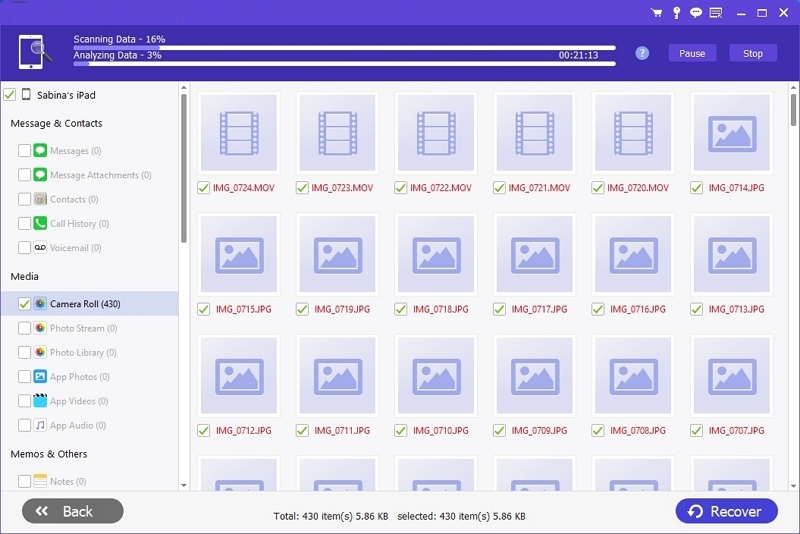
Step 4. Select and Recover
Check the photos you want and hit Recover.

Once done, you can find recovered photos in the corresponding folder on your computer.
Way 3. Seek Help from Apple Support
Apple comes third on this list for a reason. They can only help if iCloud Photos was turned on — meaning your photos were synced to Apple’s servers.
It is true that once you choose to permanently delete a folder linked to iCloud, it vanishes across all synced devices as well. Still, there’s a small grace period where those files may sit on Apple’s servers, even if your Recently Deleted folder shows nothing. In most cases, this window lasts only a day or two after permanent deletion.
What you have to do:
- Reach out to Apple Support.
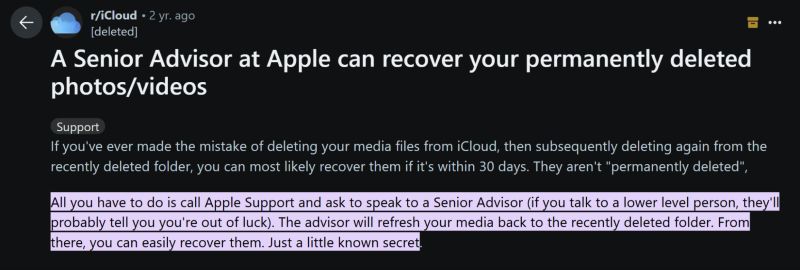
- Ask specifically to speak with a Senior Advisor.
- They can refresh your media and sometimes restore photos back into the Recently Deleted folder.
Cases shared online, including on Reddit, show users getting back hundreds of photos simply by making that call to Apple.
Can You Recover Photos from Broken/Damaged iPhone Without Backup
Even when your iPhone breaks, data loss isn’t always final. It actually depends on which parts of the iPhone have survived: a cracked screen, broken buttons, or even a dead battery means the storage sectors aren’t affected at all. Sometimes even water damage doesn’t reach the storage chip, so recovery is still possible. In all these scenarios, your photos can often be saved. And your options depend on the phone’s condition:
- If the device powers on, connect it to your computer and use Datile iOS Recovery to scan the storage and bring the images back.
- If the phone doesn’t turn on at all, you can send it for repair. Once it’s up again, you can apply the above recovery methods to pull out the photos.
How to Recover Photos You Just Deleted on iPhone
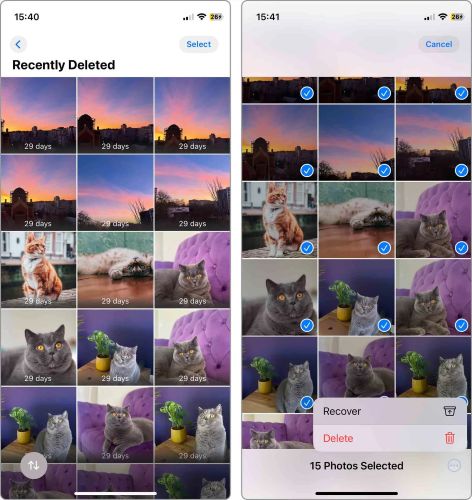
Now that the worst-case scenarios are behind us, here’s the good news: if you only just deleted the photos, recovery is almost effortless. This is because a deleted photo on the iPhone first moves to the Recently Deleted folder (the recycle bin of your Photos app). And it stays there for 30 days before being cleared out.
Follow These Simple Steps to Restore Images from Recently Deleted:
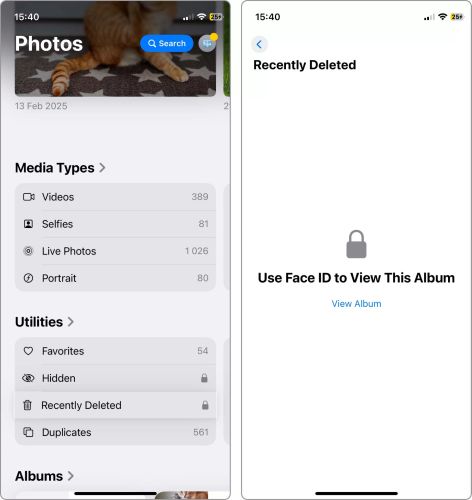
- On your iPhone, open Photos.
- Tap Albums.
- Under Utilities, select Recently Deleted. On iOS 16 and later, you’ll may be asked to scan with Face ID or Touch ID first. After the identify verification, tap View Album.
- Tap Select at the top right.
- Mark the photos you want back.
- Tap the three dots at the bottom right and choose Recover.
Instantly. The removed photos will instantly move back to your Library and Camera Roll.
To Sum Up
Permanent deletion doesn’t always mean forever loss, even when you don’t have a backup of the photos. Shared photos or Apple Support may help sometimes. However, the likelihood of getting the photos is smaller.
When those paths close, Datile iOS Recovery gives you the fastest shot. You just have to connect your iPhone to the computer, scan the storage, and recover the photos. It doesn’t matter if it’s 100 photos or 1000, Datile handles recovery with precision and high success.
Remember to act quickly and your photos will be back in your Photos app.