
Updated on 2026-03-20
views
5min read
A musician recorded hours of original ideas. An iPhone user captured her baby's first heartbeat and a late relative's voice. Another person deleted Voice Memos from iCloud to free up storage—and watched them disappear from his phone simultaneously. These are real situations from Apple's support community, and the panic they describe is the same: an audio file that feels irreplaceable is suddenly gone.
The good news is that most "deleted" voice memos haven't actually disappeared yet. The recovery method depends entirely on how the deletion happened—and this guide walks through every scenario, free options first.
Before anything else: stop recording new memos. New recordings can overwrite the storage space where deleted audio still exists as recoverable fragments. Check every free option first.
Understanding How Voice Memo Deletion Actually Works
Voice Memos on iOS 14 and later moves deleted recordings to a Recently Deleted folder and holds them for 30 days before permanent removal. This solves the majority of cases.
What makes Voice Memos more complicated than other apps is iCloud sync behavior. If iCloud Voice Memos sync is enabled, your memos exist simultaneously on your iPhone and in iCloud. Deleting from one location deletes from both—which is why dozens of Apple community threads show users who deleted Voice Memos from iCloud storage to free up space and then discovered their phone copies vanished within minutes. This is the most common scenario that catches people by surprise.
Understanding which situation you're in determines everything:
| What happened | Recovery path |
|---|---|
| Deleted within last 30 days | Recently Deleted folder — free, 30 seconds |
| Deleted from iCloud, synced to phone | Check Recently Deleted immediately; iCloud backup if missed |
| Disappeared after iOS update | Usually re-downloads; wait, then check backup |
| Permanently deleted, backup exists | iCloud or iTunes/Finder restore — free |
| Permanently deleted, no backup | Paid recovery tool — variable success |
| Recorded but app crashed mid-recording | Not recoverable — never saved to disk |
Step 1: Check Recently Deleted First (Solves ~80% of Cases)
Open Voice Memos → scroll down in the folder list → Recently Deleted.
If your memo appears here:
- Tap the memo → tap Recover to restore a single file
- Tap Edit → Recover All to restore everything at once
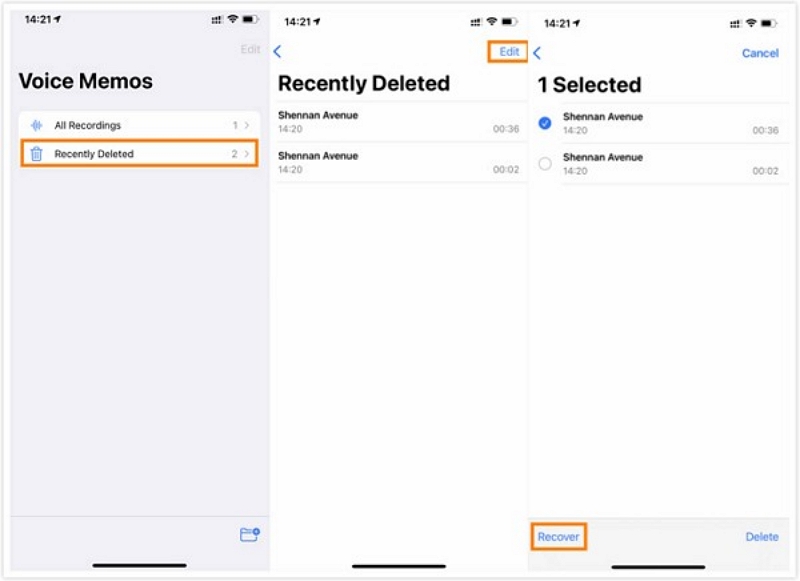
Memos stay in Recently Deleted for 30 days, then iOS permanently removes them. This folder is available on iOS 14 and later—if you're on an older iOS version and don't see it, the memo was never moved to a holding area and skipped directly to permanent deletion.
One important note: if you're using iCloud sync and deleted the memo from iCloud (not from the app directly), check Recently Deleted immediately—the sync propagates the deletion to your phone, but the Recently Deleted folder may still have the file briefly before it syncs that deletion too.
Step 2: Check These Free Locations Before Assuming It's Gone
Before trying anything that requires restoring a backup, spend two minutes checking these spots. Any of them can hold a copy of a memo that's already "deleted" from Voice Memos.
Files App → iCloud Drive
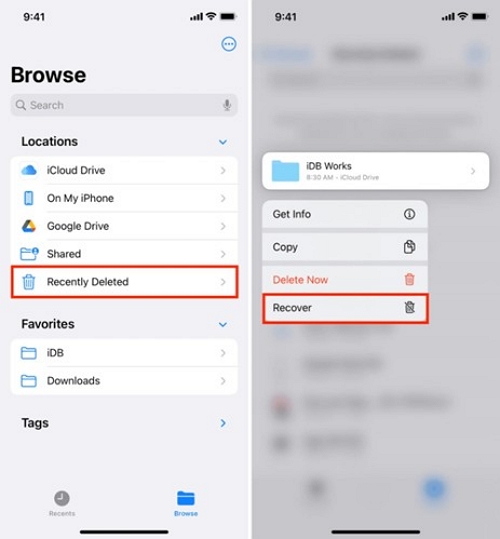
If you ever shared or exported a memo to Files, a copy may still be there. Open Files → iCloud Drive and look for a Voice Memos folder. Also check Files → Recently Deleted—this is a completely separate trash from the Voice Memos app's Recently Deleted folder, and files here can be recovered independently.
Messages, Mail, and Notes
If you shared the memo via iMessage, emailed it to yourself, or attached it to a note, the audio file still exists in those apps even after deletion from Voice Memos. Search in Messages for "Voice Memo" or the recording date. Check your email Sent folder. Open Notes and look for any note with an attached audio file.
Other Apple Devices on the Same Apple ID
If iCloud Voice Memos sync is enabled, the memo may still exist on your iPad, Mac, or another iPhone—especially if you're acting quickly before the deletion syncs across all devices.
- On Mac: Open the Voice Memos app → check both the main list and Recently Deleted
- On iPad: Open Voice Memos → main list + Recently Deleted
The timing window here is short if iCloud sync is active, so check other devices immediately.
iCloud.com — Voice Memos Data
Sign into icloud.com → click your account name → Account Settings → scroll to the bottom → look under Advanced for data recovery options. Apple occasionally makes recently deleted Voice Memos data accessible here for a limited window, separate from a full device backup restore.
B. Check Messages, Mail, and Notes
If you shared the memo via iMessage or email, or saved it in Notes, the audio file still exists there.
- Search in Messages: type "Voice Memo" or the recording date in the search bar.
- Check your own email “Sent” folder if you emailed it to yourself.
- Note: If you saved or attached the memo, it remains there even after deletion from Voice Memos.
C. Check on Other Apple Devices
The tip most competitors miss: if iCloud Voice Memos sync is on, the memo may still exist on your iPad, Mac, or another iPhone
- On Mac: open Voice Memos app → check both main list and Recently Deleted.
- On an iPad or another iPhone: Open Voice Memos → Check main list + Recently Deleted.
✅Cost: Free
Worth 2 minutes before trying anything else.
Method 1: Restore from iCloud Backup (Free)
When this works: iCloud backup was enabled before the deletion occurred, and the memo existed at the time of the last successful backup.
Check your backup date first: Settings → [Your Name] → iCloud → Manage Storage → Backups → select your device → note the date of the last backup. If it predates the deletion, this method is viable.
Steps:
- Settings → General → Transfer or Reset iPhone → Erase All Content and Settings
- When the phone restarts during setup, choose Restore from iCloud Backup
- Sign in with your Apple ID
- Select the backup dated before the memo was deleted
- Wait for the restore to complete
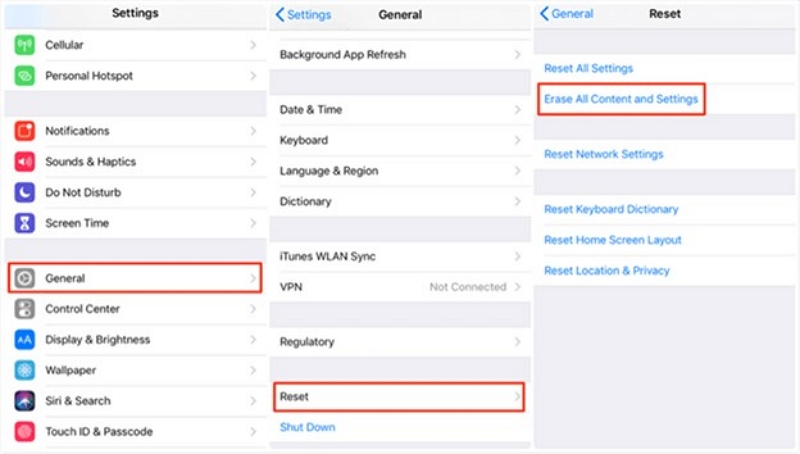
The trade-off: This replaces your entire phone with the backup state. Everything added since that backup—messages, photos, new recordings—is overwritten. Before proceeding, back up your current phone if any of that data matters to you.
Important: Many users who deleted Voice Memos from iCloud storage find that even restoring from a backup doesn't bring them back, because the iCloud deletion propagated before the backup was captured. If this is your situation, move to Method 3 (recovery tools with selective extraction).
Success rate: ~90% when a confirmed pre-deletion backup exists and iCloud backup was consistently enabled.
Method 2: Restore from iTunes / Finder Backup (Free)
When to use this: You regularly sync your iPhone to a Mac or PC, and the last sync predates the deletion.
Check your backup date:
- On Mac: Open Finder → select your iPhone in the sidebar → check the "Latest Backup" timestamp shown
- On Windows: Open iTunes → click the device icon → Summary tab → Backups section
Steps:
- Connect your iPhone to the computer
- Open Finder (Mac) or iTunes (Windows)
- Select your device → click Restore Backup
- Choose the backup dated before the memo was deleted
- Click Restore and wait
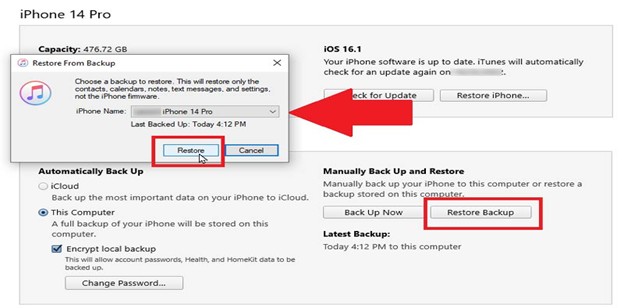
The same full-restore trade-off applies as with iCloud—all data since the backup date is overwritten. Local backups are often more recent than iCloud backups because they're triggered manually during syncs, which can mean a smaller data gap.
Success rate: ~90% when a confirmed pre-deletion backup exists.
Method 3: Extract Voice Memos Without Wiping Your Phone (Paid Tools)
When this is the right option:
- You have a backup but don't want to erase your current phone to restore one audio file
- You have no backup, and the memo was permanently deleted from Recently Deleted
- The iCloud deletion-sync problem caught you off guard and backups don't contain the memo
What these tools actually do: Voice Memos are stored as .m4a files in a protected area of iOS storage. When a file is deleted, iOS removes it from the visible directory but doesn't immediately overwrite the underlying storage. Recovery tools scan these raw storage areas for audio file fragments that haven't yet been overwritten. They can also extract Voice Memos selectively from an iCloud or iTunes backup—getting back one memo without restoring the entire device.
Recommended: Datile iOS Recoveryhas a dedicated Voice Memos recovery module and supports all three recovery modes: direct device scan, extraction from iTunes backup, and extraction from iCloud backup. Available for Mac and Windows with a free preview before purchase.
Step-by-Step:
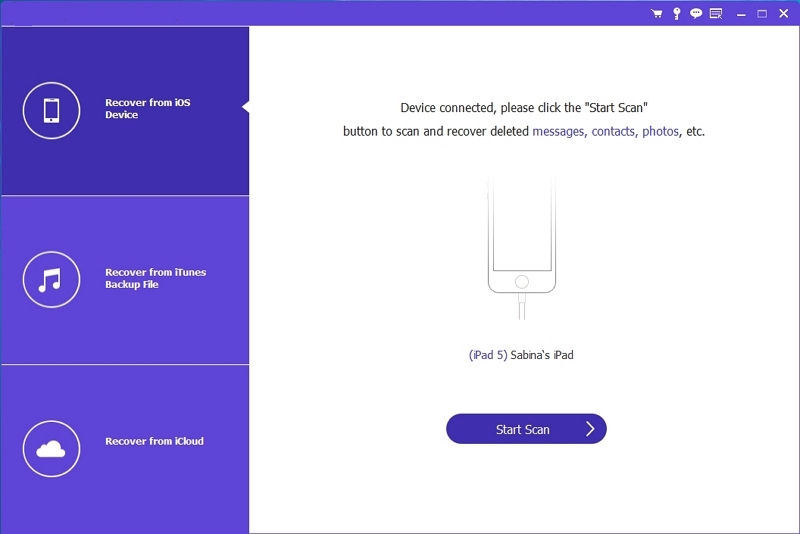
Step 1: Download and install the Datile iPhone Data Recovery tool on your PC. Connect your iPhone to your computer. Open the main interface and select “iPhone Data Recovery.”
Step 2: Run the scan. Direct device scans typically take 5–20 minutes depending on storage size. Filter the results for Voice Memos.
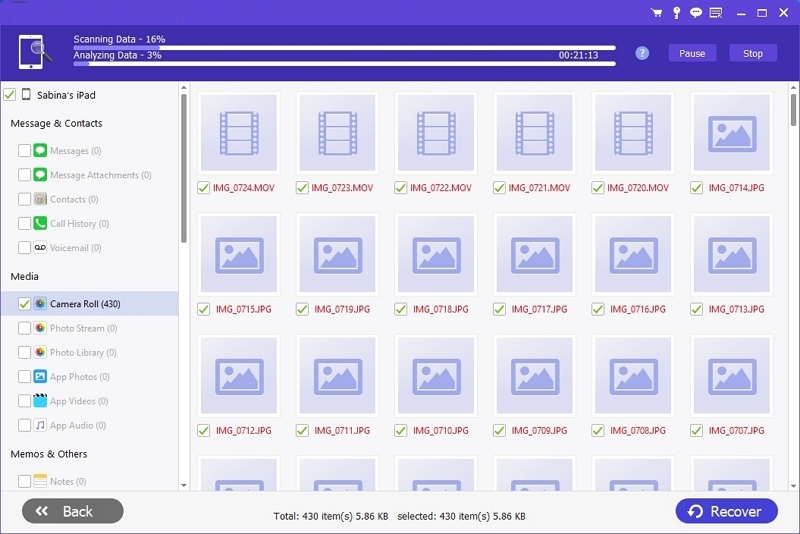
Step 3: Preview recovered files before committing. Both tools let you play back audio fragments before purchasing export. If your memo appears in the preview, the file is recoverable.
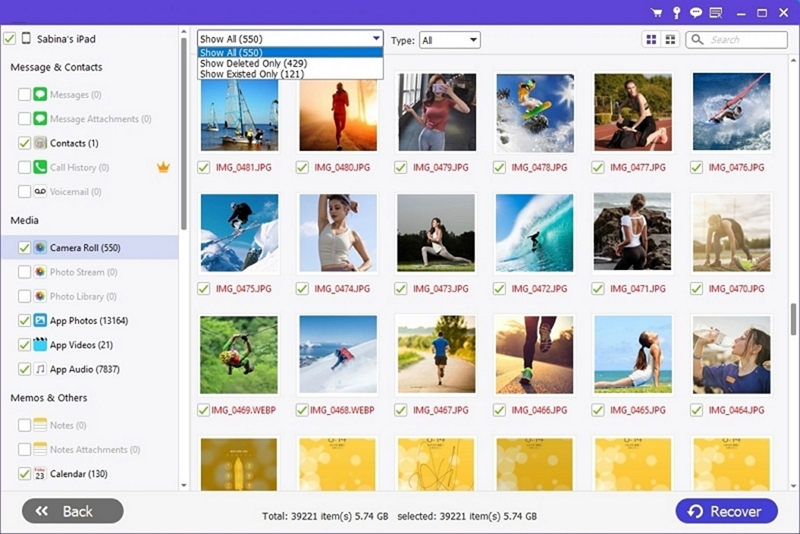
Step 4: Export to your computer as .m4a files, or restore directly to your device.
Success rate: Highly variable. High if the deletion was recent and the phone hasn't been used heavily since. Low if significant time has passed and new data has overwritten the storage space.
What Cannot Be Recovered
| Situation | Recoverable? |
|---|---|
| In Recently Deleted, within 30 days | Yes — free, takes seconds |
| Permanently deleted, backup predates deletion | Yes — free restore |
| Permanently deleted, no backup, acted immediately | Maybe — paid tool, act fast |
| Permanently deleted, no backup, heavy phone use since | Very unlikely |
| Deleted from iCloud, synced to phone, no backup | Unlikely once sync propagates |
| Memo that was never finished recording (app crash) | No — never written to disk |
The crash scenario explained: Voice Memos only writes the audio file to disk when you stop recording and the app saves it. If the app crashes during an active recording, the in-progress audio was never committed to storage—no recovery tool can retrieve data that was never saved.
Private recordings with no location traces: Unlike Safari history, Voice Memos has no "private recording" mode that would prevent saving. All recordings go to the same storage. The issue is always deletion, not the recording type.
Special Situations
"I Deleted Voice Memos from iCloud to Free Up Space and They Vanished from My Phone"
This is the most common scenario in Apple's support community, with hundreds of users reporting the same experience. When iCloud Voice Memos sync is on, the iCloud storage and your phone's local copies are treated as one library. Deleting from iCloud deletes from the phone simultaneously—not immediately in some cases, but within minutes.
If this just happened: check Recently Deleted in Voice Memos immediately. The deletion may not have fully propagated yet. If the folder is empty, your best option is a recovery tool with direct device scanning—act before new recordings or downloads overwrite the storage.
Going forward: if you want to delete Voice Memos from iCloud without losing them on your phone, turn off iCloud sync first (Settings → [Your Name] → iCloud → Voice Memos → Off), then delete from iCloud. Your phone copies will remain.
Voice Memos Disappeared After an iOS Update
iOS updates sometimes trigger a fresh iCloud sync that temporarily hides recordings while they re-download. Open Voice Memos and wait 5–10 minutes—recordings often reappear automatically. If they don't return, check whether an automatic backup was created immediately before the update (macOS often triggers one when updating via a connected Mac) and restore from it.
Recovering a Memo That Was Shared Before Deletion
Shared files survive deletion from Voice Memos. The person you shared it with still has the file—ask them to send it back. Check your email Sent folder for any memos you emailed. Check AirDrop recipients' devices; AirDrop doesn't maintain a send history on your end, but the recipient's device still has the file.
Older iPhones and iOS Versions
The Recently Deleted folder in Voice Memos requires iOS 14 or later. On iOS 13 and earlier, deleted memos bypass the holding area and go directly to permanent deletion. For these devices, iCloud or iTunes backup is the only free recovery option. Third-party tools have limited compatibility with very old iOS versions—check tool documentation for your specific iOS version before purchasing.
How to Never Lose a Voice Memo Again
Enable iCloud Voice Memos sync correctly: Settings → [Your Name] → iCloud → Voice Memos → On. This keeps copies synced across all your Apple devices. Understand the trade-off: sync means deleting on one device deletes everywhere, so be intentional about what you delete.
Enable automatic iCloud backup: Settings → [Your Name] → iCloud → iCloud Backup → toggle on. This runs daily when your phone is charging, locked, and on Wi-Fi. Voice Memos are included in every full backup.
For important recordings, export immediately: Share the memo to Files, email it to yourself, or save it to a note. One extra copy eliminates all recovery anxiety. Tap ··· on any memo → Share → choose your destination.
Know the 30-day window: Check Recently Deleted before it expires if you think you may have deleted something by mistake. Make it a habit before emptying that folder.
Don't delete Voice Memos from iCloud storage settings: If you want to reclaim iCloud space, delete individual memos from within the Voice Memos app—not from iCloud storage settings. Deleting from storage settings bypasses the app and can cause the phone-sync deletion problem described above.
FAQ
Q. Can I recover a deleted voice memo on iPhone without a backup?
Yes, if it's still in Recently Deleted (within 30 days), or if a paid recovery tool can scan your device's raw storage before the files are overwritten. Once Recently Deleted is cleared and the storage has been overwritten, recovery isn't possible without a backup.
Q. How do I recover recently deleted voice memos?
Open Voice Memos → scroll to Recently Deleted → tap the memo → Recover. To restore everything at once: Edit → Recover All.
Q. Can permanently deleted voice memos be recovered?
Yes, if you have an iCloud or iTunes/Finder backup from before the deletion. Without a backup, paid recovery tools can sometimes retrieve files from raw storage—success depends on how quickly you act and how much the phone has been used since.
Q. How long does iPhone keep deleted voice memos?
30 days in the Recently Deleted folder on iOS 14 and later. After that, iOS permanently removes them.
Q. Why did my voice memos disappear without me deleting them?
The most common cause is iCloud sync—deleting from iCloud storage removes from the phone too. Other causes include iOS update sync resets and iCloud storage conflicts. Recordings often reappear after a few minutes if it's a sync delay.
Q. Can I recover a memo that got cut off when the app crashed?
Only if the app managed to auto-save before crashing. Check Recently Deleted and the main Voice Memos list. If nothing appears, the recording was likely never committed to storage and isn't recoverable.
Q. Will a recovery tool work if my iPhone has been reset?
It depends on whether an iCloud or iTunes backup was captured before the reset. Recovery tools can extract from backups without wiping the current phone. Direct device scanning after a reset is unlikely to recover pre-reset data.