
Updated on 2026-02-13
views
5min read
Users often ask whether it is possible to recover Snapchat memories. This article discusses various methods for recovering Snapchat messages and interactions using the built-in tools, iCloud backups, or 3rd party software. We introduce a reliable solution to help you easily recover your Snapchat memories on your iPhone.
Quick Summary — Best Methods at a Glance
| Best For | Method | Backup Needed | Computer Required | Time | Success Rate |
|---|---|---|---|---|---|
| Without backup | Datile iOS Recovery | No | Yes | 5–10 min | ★★★★★ (80–95%) |
| Using iCloud | Restore from iCloud Backup | Yes | No | 15–30 min | ★★★★☆ (70–90%) |
| Using iTunes/Finder | Restore from Computer Backup | Yes | Yes | 20–40 min | ★★★★☆ (70–90%) |
| Checking photos | Recently Deleted Folder | Optional | No | 2–3 min | ★★★★★ (90–100%) |
| Checking metadata | Snapchat “My Data” | No | No | 5–10 min | ★★★☆☆ (30–60%) |
Can You Recover Deleted Snapchat Memories on iPhone?
Yes. You can recover deleted Snapchat Memories on iPhone if:
- They were recently deleted and cached by Snapchat.
- You have a valid iCloud or iTunes backup created before deletion.
- The snaps were exported to your Camera Roll.
- You use a third-party recovery tool that can scan your iPhone storage.
If you have no backup, don’t panic — apps like Datile iOS Recovery can deeply scan your device and retrieve deleted Snapchat Memories even without iCloud access.
How Snapchat Memories Work
Snapchat Memories are stored in Snapchat’s secure cloud servers and linked to your account.
When you delete a Memory, it’s removed from your visible feed, but cached or backed-up copies might still exist temporarily — that’s your recovery window.
When Recovery Is Possible
- Accidental deletion: If deleted recently, the data might still exist in cache or cloud storage.
- Backed-up Memories: If you synced to iCloud or exported snaps, they can often be restored.
- No backup: You’ll need a professional iPhone data recovery tool.
5 Verified Methods to Recover Deleted Snapchat Memories on iPhone
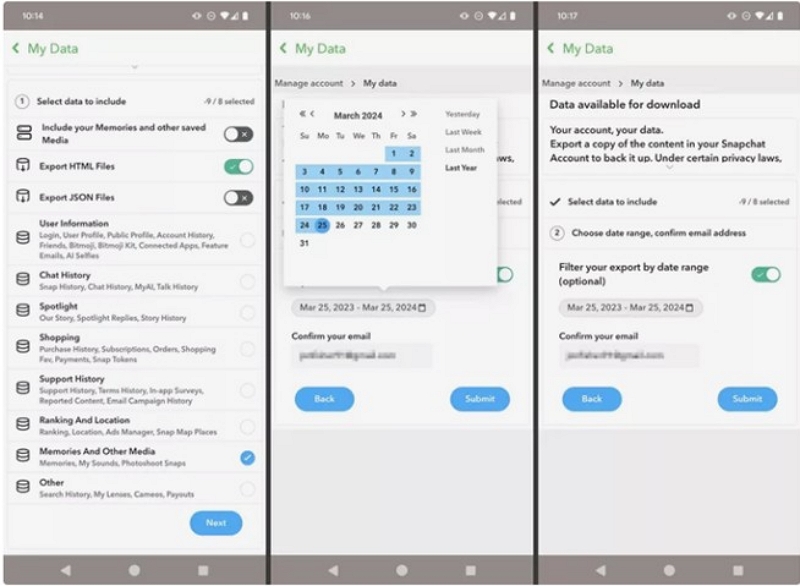
Method 1: Recover from Snapchat “My Data” (Official Way)
This is Snapchat’s official method to check if any data, including Memories info, can be recovered.
Steps:
Step 1: Open Snapchat and tap your Profile icon.
Step 2: Tap the gear icon to open “Settings” and scroll to “My Data” and log in.
Step 3: Request your data and wait for the download link to be sent to you via email.
Step 4: Download the file from your email. Unzip it to check for Memories info.
Pros
100% safe, official Snapchat method.
Free to use, no third-party tools.
Includes metadata (timestamps, sender info, snap history).
Cons
Does not include deleted photos/videos.
Can take several hours or days.
Limited recovery scope.
Success Rate:
- Actual media recovery: 10–30%
- Metadata recovery: 40–60%
Inference:
Best used for verification and metadata retrieval, not full photo/video recovery.
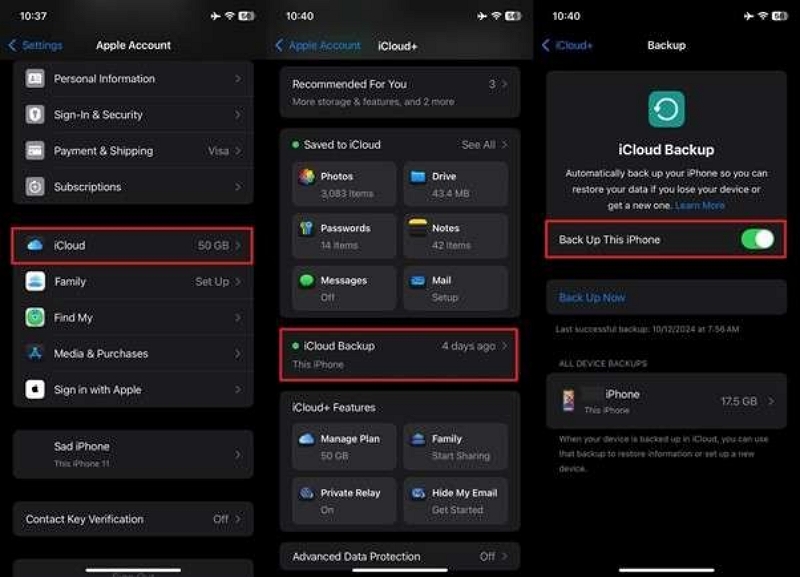
Method 2: Recover Deleted Snapchat Memories iPhone via iCloud Backup
If you regularly back up your iPhone, you can restore deleted Snapchat Memories on iPhone using iCloud.
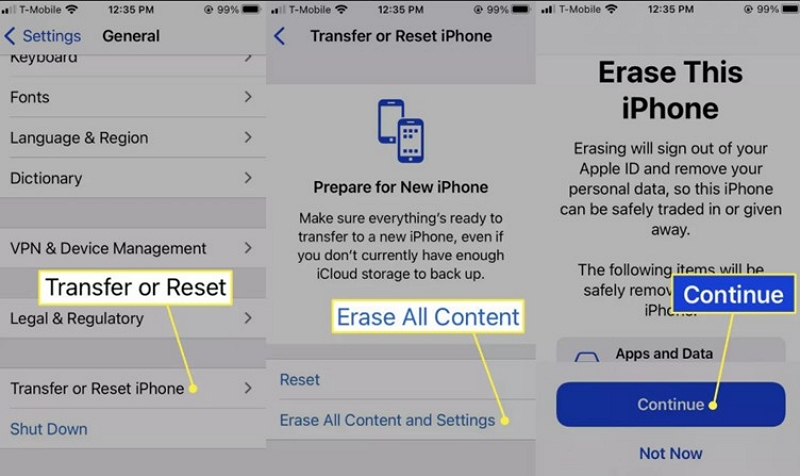
Step 1: Go to Settings > General > Transfer or Reset iPhone.
Step 2: Tap Erase All Content and Settings.
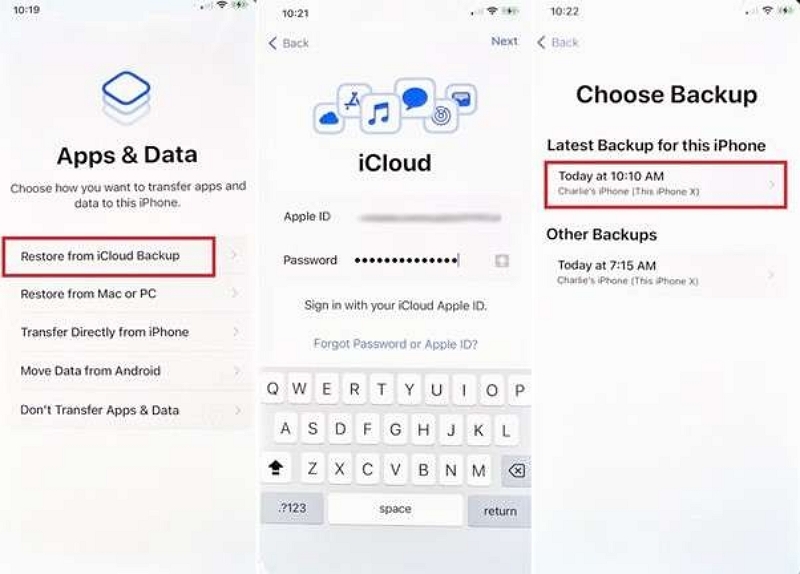
Step 3: During setup, choose Restore from iCloud Backup.
Step 4: Select a backup created before your Memories were deleted.
Pros
Restores all app data, including Snapchat.
Uses Apple’s secure built-in backup system.
Works well if Memories were saved to Camera Roll or iCloud Photos.
Cons
Overwrites your existing data.
Requires full device reset.
Only works if the backup contains the deleted Memories.
Success Rate:
- No backup: 10–30%
- With old iCloud backup: 70–90%
Inference:
A reliable method for those who back up regularly to iCloud.
Method 3: Restore Deleted Snapchat Memories from iTunes/Finder Backup
If you’ve previously backed up your iPhone to a computer, this is a great alternative to iCloud.
Step 1: Connect your PC to your iPhone using a USB cable.
Step 2: Open iTunes (Windows/macOS Mojave or earlier) or Finder (macOS Catalina or later).
Step 3: Select your device and click “Restore Backup.”
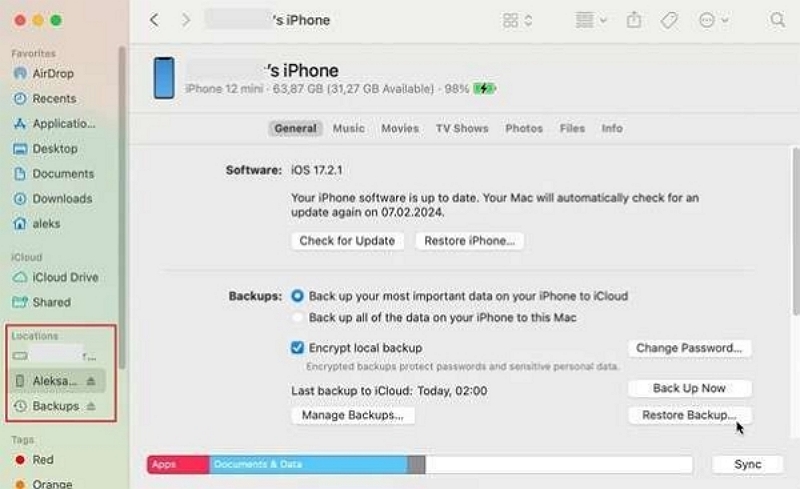
Step 4: Choose a backup that is likely to contain the Memories.
Pros
Works offline.
Restores your entire device state, including Snapchat data.
Higher success if Memories were saved to Camera Roll.
Cons
Overwrites current files.
No selective recovery.
Requires a relevant backup.
Success Rate:
- No backup: 10–30%
- Proper backup before deletion: 70–90%
Inference:
Excellent choice for offline users who back up regularly to their computer.
Method 4: Recover Deleted Snapchat Memories iPhone Without Backup
If you have no backup or iCloud access, you can still recover deleted Snapchat Memories iPhone without backup using Datile iOS Recovery.
Key Features:
- Datile supports all iOS versions and devices.
- This method performs a deep scan of the device and backups.
- You can preview the deleted data before it is recovered.
- This method offers selective recovery of Snapchat data.
- It offers recovery from the device and from iCloud/iTunes/Finder backups.
Step 1: Download the official version of the Datile software from Datile.com. Install it on your PC. Connect your PC to the iPhone using a USB cable.
Step 2: Open Datile and select “iPhone Data Recovery.” Click on “Recover from iOS device.”
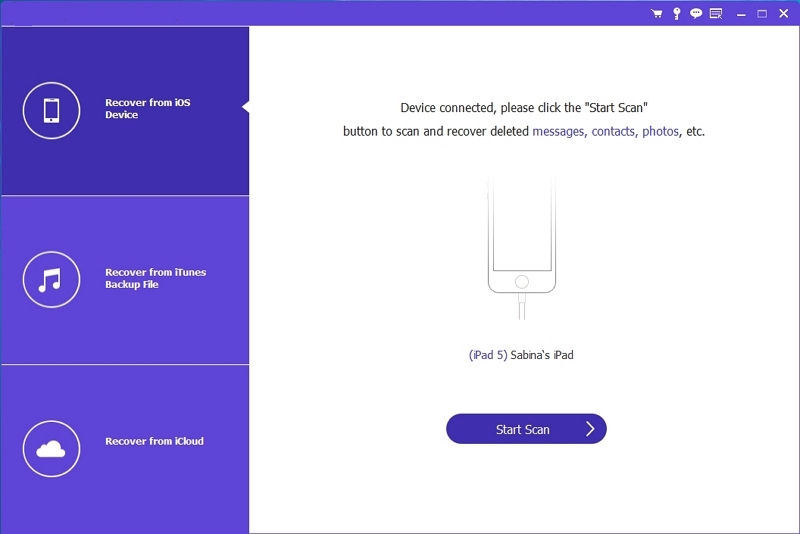
Step 3: Once you connect to your iPhone, click “Start Scan.”
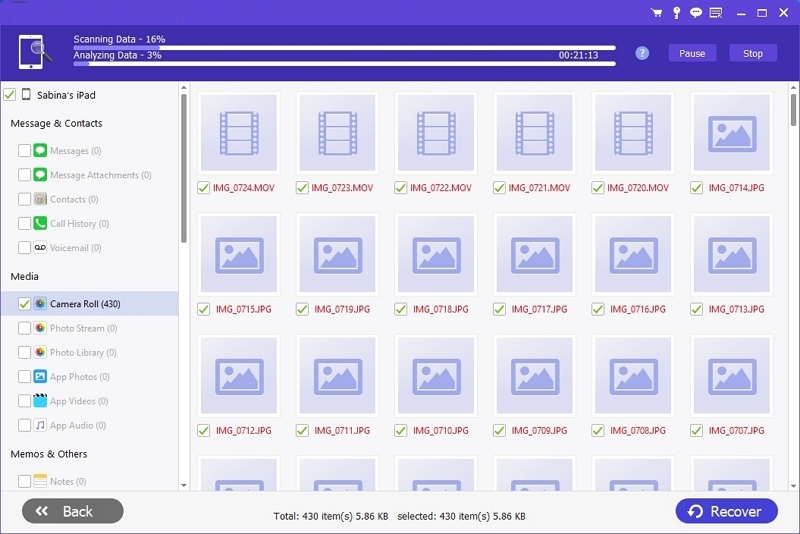
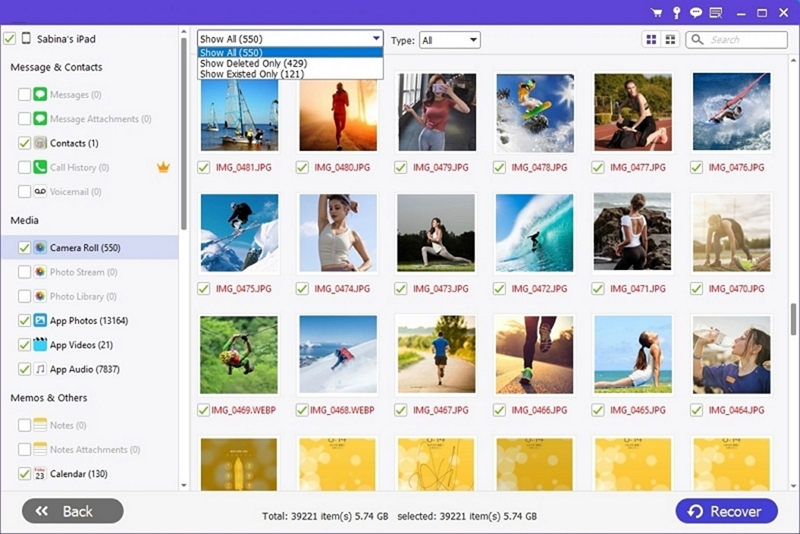
Step 4: You can view the lost files on the screen. Select Snapchat Memories and click on “Recover.”
Pros
Works without backup.
Allows selective recovery (no need to restore the full phone).
Supports all iOS versions and models.
Scans both device and iCloud/iTunes data.
Cons
Paid software for full recovery.
Requires computer access.
Success depends on whether data is overwritten.
Success Rate:
- Without backup: 50–70%
- If previously saved to Camera Roll/backups: 80–95%
Inference:
Best all-around solution to recover deleted Snapchat Memories iPhone — especially when no backup exists.
Method 5: Recover from Recently Deleted Photos Folder on iPhone
If your Memories were exported to your Camera Roll, you might recover them directly.
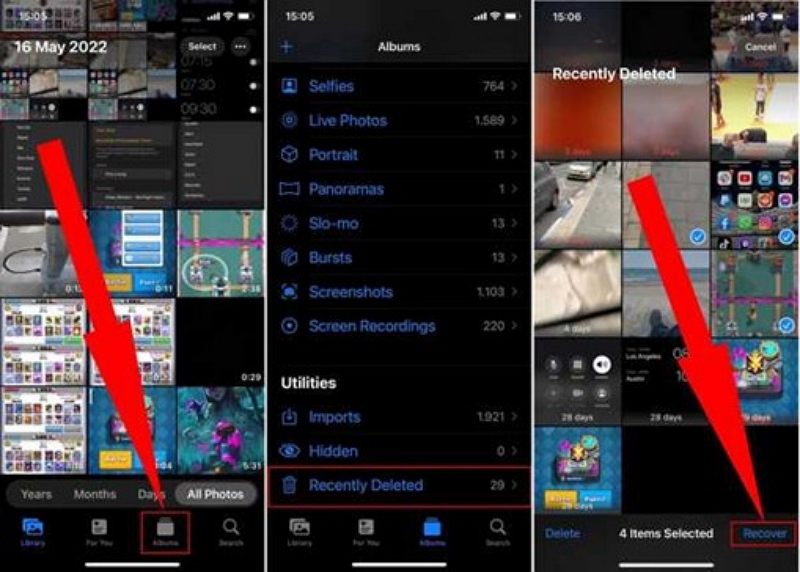
Step 1: Open the Photos app on your iPhone.
Step 2: Tap “Albums” and scroll down to the “Utilities” section.
Step 3: Tap Recently Deleted and browse the deleted photos and videos.
Step 4: Select the items you want to recover and tap “Recover.”
Pros
Fast, built-in, and 100% safe.
Full-resolution media recovery.
No app installation required.
Cons
Works only for items deleted within 30 days.
Only applies to exported Memories.
Success Rate:
- Deleted in last 30 days: 90–100%
- Never saved to Camera Roll: 0%
Inference: Perfect for recently deleted, exported Snapchat Memories.
Bonus: Prevent Future Loss — Enable Smart Backup on Snapchat
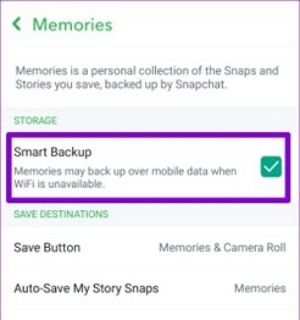
Here’s a bonus. You can enable Smart Backup on Snapchat to avoid losing Memories again.
Step 1: Open Snapchat → Tap your Profile icon.
Step 2: Go to Settings > Memories.
Step 3: Turn on Smart Backup.
Step 4: Under “Save Button,” select Memories & Camera Roll.
Pros
Automatic, cloud-based protection.
Works on mobile data.
Prevents permanent loss during reinstall or phone reset.
Cons
Uses mobile data if Wi-Fi is off.
Doesn’t save exported snaps unless you enable Camera Roll saving.
Success Rate:
- With Smart Backup: 95–100%
- With iCloud/Camera Roll sync: 100%
Inference:
Smart Backup is the easiest way to secure your Memories permanently.
Method Comparison Table
| Method | Backup Needed | Computer Required | Recovery Type | Success Rate | Recommended For |
|---|---|---|---|---|---|
| Snapchat “My Data” | No | No | Metadata only | ★★☆☆☆ | Basic info verification |
| iCloud Backup | Yes | No | Full restore | ★★★★☆ | iCloud users |
| iTunes/Finder | Yes | Yes | Full restore | ★★★★☆ | Offline backup users |
| Datile Tool | No | Yes | Selective recovery | ★★★★★ | No backup situations |
| Recently Deleted | Optional | No | Full media recovery | ★★★★★ | Exported snaps |
Recover Deleted Snapchat Memories iPhone Without Computer
If you don’t have a computer, don’t worry. You can still:
- Use My Data (official Snapchat method).
- Restore iCloud backup from your iPhone settings.
- Check the Recently Deleted folder in Photos.
These three methods let you recover deleted Snapchat Memories on iPhone without computer — though recovery rate is lower compared to desktop tools.
Frequently Asked Questions (2026)
1. How do you recover deleted Snapchat Memories on Android?
Android users can also recover Snapchat Memories.
Step 1: Open your File manager app.
Step 2: Navigate to Internal Storage > Android > data > com.snapchat.android > cache
Step 3: Look for folder names that include 'received_image_snaps' or similar names.
Step 4: Browse for image or video files with .nomedia or standard formats, such as .jpg or .mp4.
Step 5: Rename .nomedia files to .jpg or .mp4 to preview them.
Step 6: Move the recovered files to a visible folder, such as the DCIM or Downloads folder.
2. Can I recover Snapchat Memories after 30 days?
Yes, but only if:
- The Memories were exported to Camera Roll or cloud before deletion.
- You use a third-party iPhone recovery tool like Datile to find residual data.
- You requested data through Snapchat My Data before cache clearance.
3. Will restoring from backup delete my new data?
Yes, restoring an old backup overwrites your iPhone’s current data.
To avoid this, use Datile iOS Recovery — it allows selective recovery without erasing existing files.
Conclusion
Losing your Snapchat Memories doesn’t mean they’re gone forever.
Whether you’re trying to recover deleted Snapchat Memories on iPhone without backup, through iCloud, or using a data recovery tool, one of the methods above will work for you.
For the highest success rate and safest process, Datile iOS Recovery remains the top choice — it helps you recover deleted Snapchat Memories iPhone even when no backup or computer access exists.
Enable Smart Backup today to ensure your Snapchat Memories are never lost again.